

Introduction
This article explains fetching data from MySQL with Ajax in PHP. To do that you will first create a table and store some data in it for retrieving with Ajax and transform the array data from MySQL to XML using a DOM element. Ajax will read the data from the MySQL server form of XML data using PHP code. First of all You will create a client-side file use of HTML with Ajax and then create a connection with your database in MySQL then create the PHP code.
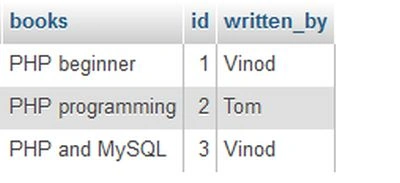
Example
This is the "index.html" file.
<html>
<head>
<meta http-equiv="Content-Type" content="text/html; charset=utf-8" />
<books>Ajax</books>
<script type="text/javascript">
var xml_http = xml_request_object();
function xml_request_object(){
var xml_http;
try
{
xml_http = new XMLHttpRequest();
}
catch(e)
{
try
{
xml_http = new ActiveXObject("Microsoft.XMLHTTP");
}
catch(e){ }
}
if (!xml_http)
alert("Error creating the XMLHttpRequest Object");
else
return xml_http;
}
function get_ready()
{
if(xml_http)
{
try
{
xml_http.open("Get","new_books.php", true);
xml_http.onreadystatechange = RequestChange;
xml_http.send(null);
}
catch(e)
{
alert("Can't connect to server\n" + e.toString());
}
}
}
function RequestChange()
{
newDiv = document.getElementById("createDiv");
if(xml_http.readyState == 1)
{
newDiv.innerHTML += "Loading your request one <br/>";
}
else if (xml_http.readyState == 2)
{
newDiv.innerHTML += "Loading your request two <br/>";
}
else if (xml_http.readyState == 3)
{
newDiv.innerHTML += "Request three intractive <br/>";
}
else if (xml_http.readyState == 4)
{
if(xml_http.status == 200)
{
try
{
xmlData();
}
catch(e)
{
alert("Not response : " + e.toString());
}
}
else
{
alert("Problem in getting data:" + xml_http.statusText);
}
}
}
function xmlData()
{
var response = xml_http.responseXML;
xmlRoot = response.documentElement;
idArray = xmlRoot.getElementsByTagName("id");
booksArray = xmlRoot.getElementsByTagName("books");
written_byArray = xmlRoot.getElementsByTagName("written_by");
var html = "";
for( var i=0; i<booksArray.length; i++)
{
html += idArray.item(i).firstChild.data + "- " + booksArray.item(i).firstChild.data + ", " + written_byArray.item(i).firstChild.data + "<br/>";
}
newDiv = document.getElementById("createDiv");
newDiv.innerHTML += "Final request: 4(complete). <br /> .Server said: <br />";
newDiv.innerHTML += html;
}
</script>
</head>
<body onLoad="get_ready()">
Your records:
<div id="createDiv" />
</body>
</html>
And this is the "index.php" code and this file will create a XML document.
<?php
header('Content-type: text/xml');
mysql_connect('localhost','root','');
mysql_select_db('demo');
$query = "Select * from `data`";
$result = mysql_query($query) or die(mysql_error());
$dom_elements = new DOMDocument();
$ddda = $dom_elements->createElement('ddda');
$dom_elements->appendChild($ddda);
while($r = mysql_fetch_array($result)){
$id = $dom_elements->createElement('id');
$idText = $dom_elements->createTextNode($r['id']);
$id->appendChild($idText);
$books = $dom_elements->createElement('books');
$booksText = $dom_elements->createTextNode($r['books']);
$books->appendChild($booksText);
$written_by = $dom_elements->createElement('written_by');
$written_byText = $dom_elements->createTextNode($r['written_by']);
$written_by->appendChild($written_byText);
$book = $dom_elements->createElement('book');
$book->appendChild($id);
$book->appendChild($books);
$book->appendChild($written_by);
$ddda->appendChild($book);
}
$string = $dom_elements->saveXML();
echo $string;
?>
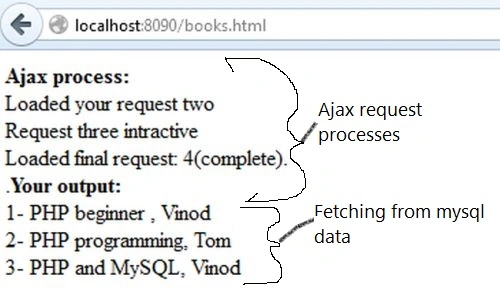
Output
Join the conversation! Your thoughts help the community grow.