

Hi guys, In this article you will learn how to
use jQuery to add a Datepicker in Expression Web4. It is not a big deal to work
out but quite interesting for the beginners. Here I have used the Datepicker in
through the Record form entry in which validation is also used to give much
better look to the user.
Follow the steps below to implement this application:
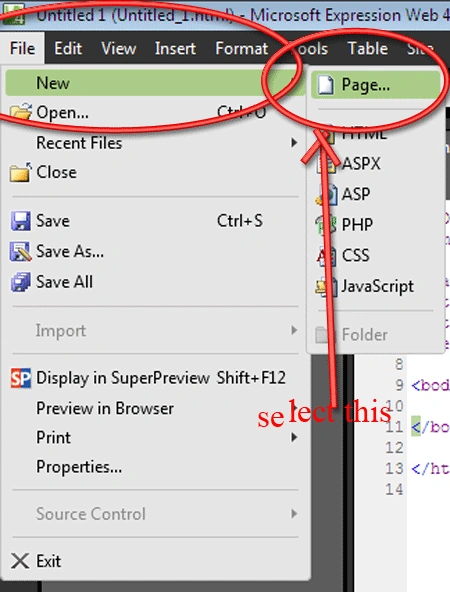
Step 1 : Open a new HTML page by selecting File--> New-->Page--> HTML.
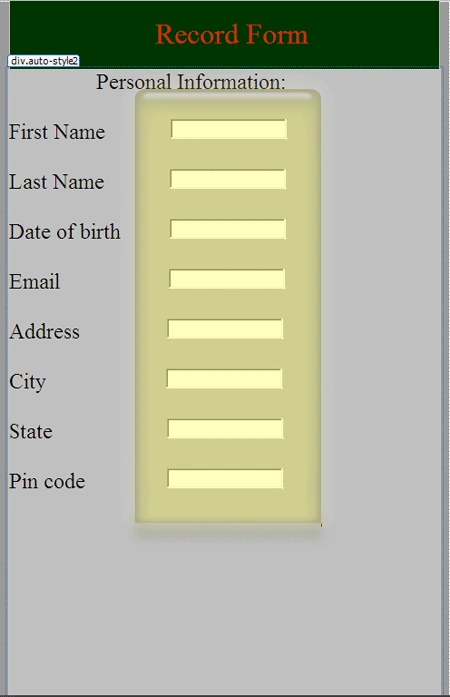
Step 2 : Now in the page so opened, add a <div></div> tag to give nice look to the form.
Step 3 : Then add textbox from the toolbox and arrange them in this way aside the Text fields.
Step 4 : Now type the following code in the code panel.
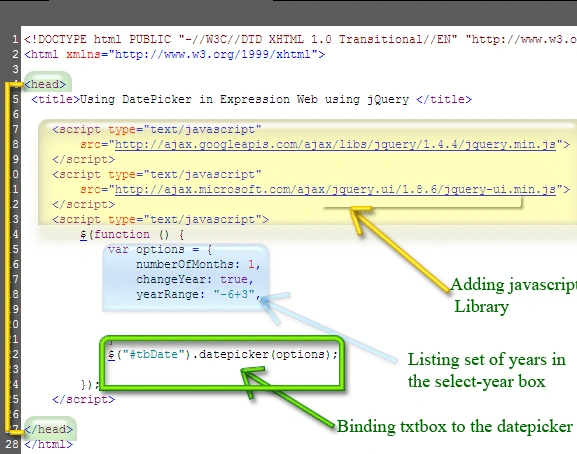
Step 5 : Here what happens in the code is that a text box named "tbDate" is bind with the Datepicker control and functionality is added to the Datepicker such that it will display list of previous six years and next three years from the current year. Also the code calendar is displayed as soon as the textbox is clicked.
Step 6 : Now adding Validation to the texboxes. Add validations to these fields :
- State : Required field validator
- pin code : Required field validator
- Email Id : Regular Expression Validator Of Internet Email Format
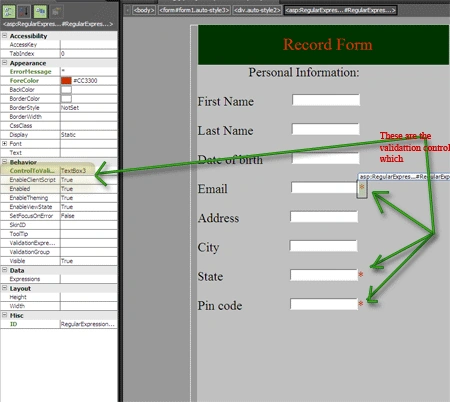
Step 7 : Now add a button so that the page refreshes to check for validation :
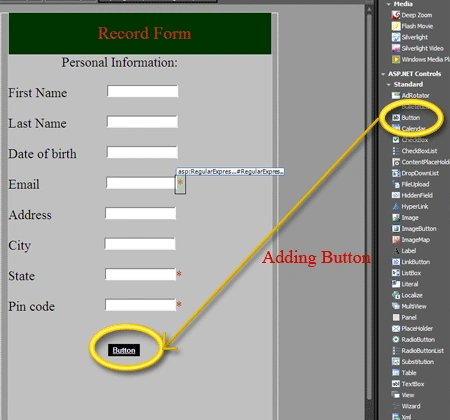
Step 9 : The complete code in HTML is
as follows:
<!DOCTYPE
html
PUBLIC
"-//W3C//DTD XHTML 1.0
Transitional//EN"
"http://www.w3.org/TR/xhtml1/DTD/xhtml1-transitional.dtd">
<html
xmlns="http://www.w3.org/1999/xhtml">\
<head>\
<title>Using
DatePicker in Expression Web using jQuery
</title>
<script
type="text/javascript"
src="http://ajax.googleapis.com/ajax/libs/jquery/1.4.4/jquery.min.js">
</script>
<script
type="text/javascript"
src="http://ajax.microsoft.com/ajax/jquery.ui/1.8.6/jquery-ui.min.js">
</script>
<script
type="text/javascript">
$(function
()
{
var options = {
numberOfMonths: 1,
changeYear: true,
yearRange: "-6+3",
}
$("#tbDate").datepicker(options);
</script>
<style
type="text/css">
.auto-style1 {
font-size:
xx-large;
}
.auto-style2 {
margin-left:
131px;
}
.auto-style3 {
margin-left:
117px;
}
</style>
</head>
<body
bgcolor="#999999">\
<form
id="form1"
runat="server"
class="auto-style3"
style="height:
784px; width:
500px">
<div
style="width:
473px; height:
75px; color:
#CC3300; background-color:
#003300; position:
fixed; left:
142px; top:
15px;">
<br
/>
&nbs; &nnbsp;
<span
class="auto-style1">Record
Form</span></div>
<br
/><br
/><br
/><br
/>
<div
class="auto-style2"
style="width:
475px; height:
706px; color:
#000000; background-color:
#C0C0C0; font-size:
x-large; position:
fixed;
left:10px;
top:
91px;">Personal Information:<br
/><br
/>
First Name
<asp:TextBox
id="TextBox1"
runat="server"></asp:TextBox><br
/><br
/>
Last Name
<asp:TextBox
id="TextBox2"
runat="server"></asp:TextBox><br
/><br
/>
Date of birth
<input
id="tbDate"
type="text"
/><br
/><br
/>
Email
<asp:TextBox
id="TextBox3"
runat="server"></asp:TextBox>
<asp:RegularExpressionValidator
id="RegularExpressionValidator1"
runat="server"
ControlToValidate="TextBox3"
ErrorMessage="*"
ForeColor="#CC3300"></asp:RegularExpressionValidator><br
/><br
/>
Address
<asp:TextBox
id="TextBox4"
runat="server"></asp:TextBox><br
/><br
/>
City
<asp:TextBox
id="TextBox5"
runat="server"></asp:TextBox><br
/><br
/>
State
<asp:TextBox
id="TextBox8"
runat="server"></asp:TextBox>
<asp:RequiredFieldValidator
id="RequiredFieldValidator2"
runat="server"
ControlToValidate="TextBox8"
ErrorMessage="*"\
ForeColor="#CC3300"></asp:RequiredFieldValidator><br
/><br
/>
Pin code
<asp:TextBox
id="TextBox7"
runat="server"></asp:TextBox>
<asp:RequiredFieldValidator
id="RequiredFieldValidator1"
runat="server"
ControlToValidate="TextBox7"
ErrorMessage="*"\
ForeColor="#CC3300"></asp:RequiredFieldValidator><br
/><br
/>
<br
/>
<asp:Button
id="Submit"
runat="server"
BackColor="Black"
BorderStyle="None"
Font-Bold="True"
Font-Underline="True"
ForeColor="White"
Text="Button"/>
</div>
</form>
</body>
</html>
Step 10 : Now click on the preview button and see the output in the browser:
Output1:
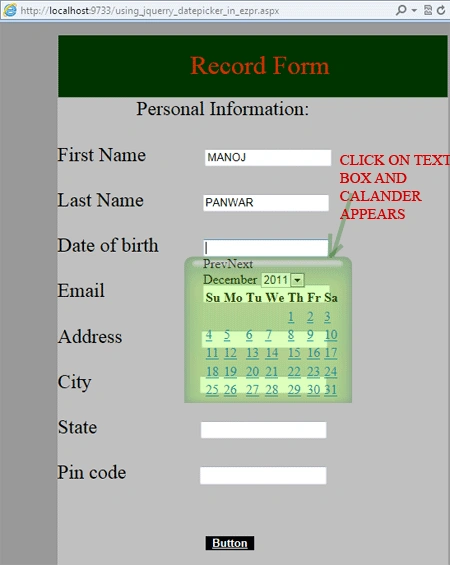
Output 2:
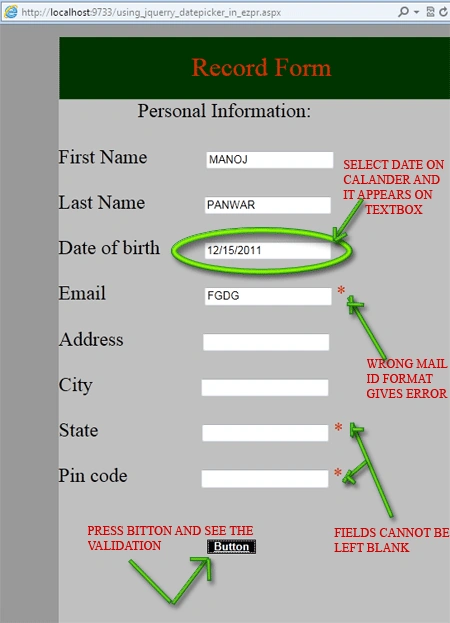
Output3:
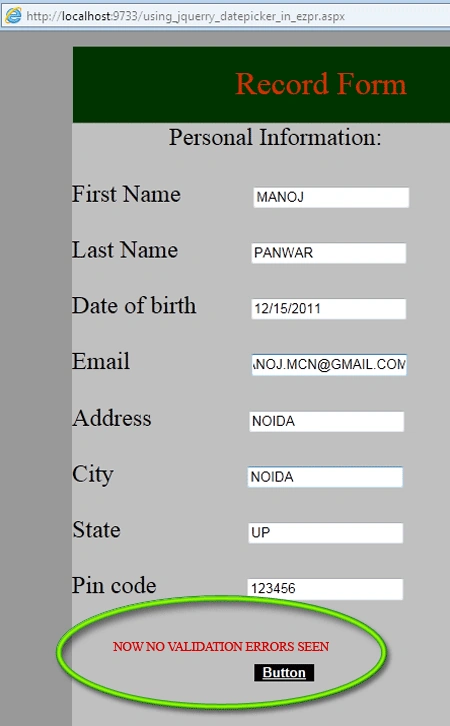
ravi kumarPosted Dec 7, 2011, 10:04 AM
Hi Manoj, Where did you call the Javascript function for tbDate control.