

Look at the following image: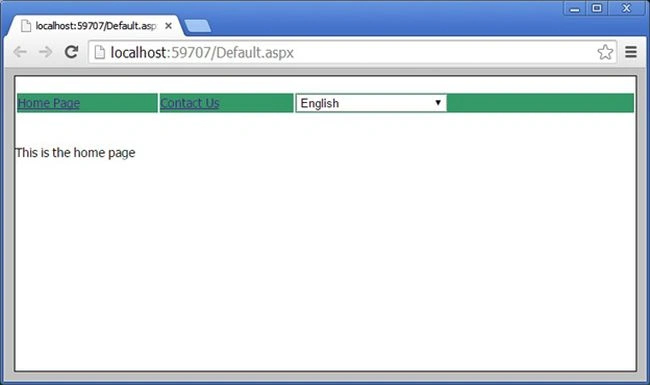
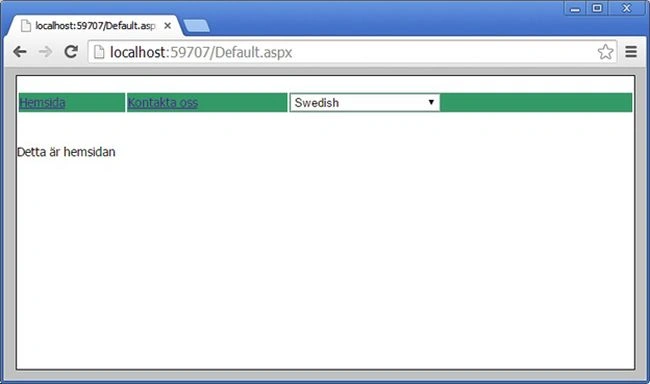
We can create the Multilanguage application in ASP.NET like the following.
Step 1
Add the Master Page Site1.Master and design the menu and language selection dropdown list like this:
- <%@ Master Language="C#" AutoEventWireup="true" CodeBehind="Site1.master.cs" Inherits="MultilanguageSample.Site1" %>
- <!DOCTYPE html>
- <html xmlns="http://www.w3.org/1999/xhtml">
- <head runat="server">
- <title></title>
- <style type="text/css">
- html {
- font-family: Tahoma;
- font-size: 14px;
- font-style: normal;
- background-color: Silver;
- }
- .Content {
- margin: auto;
- width: 700px;
- background-color: white;
- border: Solid 1px black;
- }
- .auto-style1 {
- width: 100%;
- }
- </style>
- <asp:ContentPlaceHolder ID="head" runat="server">
- </asp:ContentPlaceHolder>
- </head>
- <body>
- <form id="form1" runat="server">
- <div class="Content">
- <br />
- <table class="auto-style1">
- <tr>
- <td style="background-color: #339966"> <a href="Default.aspx">
- <asp:Label ID="Label1" meta:resourcekey="menuItemDefault" runat="server" Text="Home"></asp:Label>
- </a></td>
- <td style="background-color: #339966; " ><a href="Contact.aspx">
- <asp:Label ID="Label2" meta:resourcekey="menuItemContact" runat="server" Text="ContactUs"></asp:Label>
- </a></td>
- <td style="background-color: #339966;"><asp:DropDownList ID="DropDownList_Language" runat="server" Height="20px" Width="170px"
- OnSelectedIndexChanged="DropDownList_Language_SelectedIndexChanged" AutoPostBack="true">
- <asp:ListItem Value="en-US">English</asp:ListItem>
- <asp:ListItem Value="sv-SE">Swedish</asp:ListItem>
- </asp:DropDownList></td>
- </tr>
- </table>
- <br />
- <br />
- <div>
- <asp:ContentPlaceHolder ID="ContentPlaceHolder1" runat="server">
- </asp:ContentPlaceHolder>
- </div>
- </div>
- </form>
- </body>
- </html>
Write the code in the code behind file like this:
- using System;
- using System.Collections.Generic;
- using System.Linq;
- using System.Web;
- using System.Web.UI;
- using System.Web.UI.WebControls;
- namespace MultilanguageSample
- {
- public partial class Site1 : System.Web.UI.MasterPage
- {
- protected void Page_Load(object sender, EventArgs e)
- {
- if (Session["language"] != null && !IsPostBack)
- {
- DropDownList_Language.ClearSelection();
- DropDownList_Language.Items.FindByValue(Session["language"].ToString()).Selected = true;
- }
- }
- protected void DropDownList_Language_SelectedIndexChanged(object sender, EventArgs e)
- {
- switch (DropDownList_Language.SelectedValue)
- {
- case "en-US": this.SetMyNewCulture("en-US");
- break;
- case "sv-SE": this.SetMyNewCulture("sv-SE");
- break;
- default:
- break;
- }
- Response.Redirect(Request.Path);
- }
- private void SetMyNewCulture(string culture)
- {
- Session["language"] = culture;
- }
- }
- }
Step 3
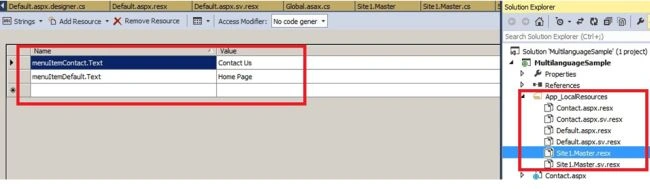
Create a “App_LocalResources” folder and add the resources as page wise.
Like Site.master.resx for English and Site1.Master.sv. resx for Swedish.
Note: Keep the separate resource file for each page for better maintainability.
Step 4
Add this method in the global.asax file:
- void Application_AcquireRequestState(object sender, EventArgs e)
- {
- HttpContext context = HttpContext.Current;
- if (context.Session["language"] != null)
- {
- Thread.CurrentThread.CurrentUICulture = new CultureInfo(context.Session["language"].ToString().Trim());
- Thread.CurrentThread.CurrentCulture = new CultureInfo(context.Session["language"].ToString().Trim());
- }
- }
Step 5
Call the resource key on the label like this as page wise.
- <asp:Label ID="Label1" meta:resourcekey="menuItemDefault" runat="server" Text="Home"></asp:Label>
- protected void Page_Load(object sender, EventArgs e)
- {
- lblMsg.Text = GetLocalResourceObject("lblMsgHome.Text").ToString();
- }
Kirit PansuriyaPosted Jul 15, 2015, 1:41 AM
Error is :- An exception of type 'System.NullReferenceException' occurred in MultilanguageSample.dll but was not handled in user code Additional information: Object reference not set to an instance of an object.
Kirit PansuriyaPosted Jul 15, 2015, 1:38 AM
hello i have an error when i have start my project that give an error.
Chandradev PrasadPosted Nov 13, 2014, 2:41 AM
Thanks for your comment. But there are some drawback. Groogle Translation doesn't give the correct translated output. So client doesn't prefer this approach.
Naveen GcPosted Nov 13, 2014, 1:48 AM
Good one.. But, if you want your whole website to translate into more than 60 languages.. use this ... http://translate.google.com/manager/website/suggestions (Online mode). This has a feature of less coding...
Chandradev PrasadPosted Nov 11, 2014, 12:59 PM
Thanks Humayun.
Humayun Kabir MamunPosted Nov 11, 2014, 4:19 AM
nice...
Chandradev PrasadPosted Nov 10, 2014, 4:57 AM
Nice to know it.
wikum wijeysooriyaPosted Nov 5, 2014, 5:26 AM
Yeah.its a good one ..solved my entire issues with this..cheers ..thanks Chandradev
Chandradev PrasadPosted Oct 21, 2014, 10:18 PM
Thank You Vithal.
Vithal WadjePosted Oct 21, 2014, 2:34 PM
good one Chandradev keep it up