

Introduction
In this article I am trying to explain Custom Caching Provider in ASP.NET 4.0 or 4.5. I have created a sample in Visual Studio 2011.
Purpose
Caching enables you to store data in memory for rapid access. When the data is accessed again, applications can get the data from the cache instead of retrieving it from the original source. This can improve performance and scalability. In addition, caching makes data available when the data source is temporarily unavailable.
Code:
Step 1: Create two new projects; one is Web Application and the other is Class Library.
Step 2: Now open the Class Library project and add a reference for System.Web assembly.
Step 3: Now inherit your class from OutputCacheProvider Class.
Step 4: Now override all Add, Get, Set and Remove Methods.
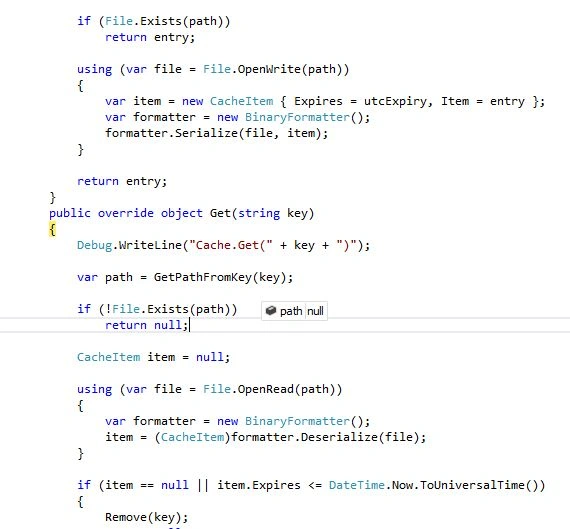
Here is sample Code.
public class FileCacheProvider : OutputCacheProvider
{
private string _filecachePath;
public string FilecachePath
{
get
{
if (!string.IsNullOrEmpty(_filecachePath))
return _filecachePath;
_filecachePath = System.Configuration.ConfigurationManager.AppSettings["OutputCachePath"];
var context = HttpContext.Current;
if (context != null)
{
_filecachePath = context.Server.MapPath(_filecachePath);
if (!_filecachePath.EndsWith("\\"))
_filecachePath += "\\";
}
return _filecachePath;
}
}
public override object Add(string key, object entry, DateTime utcExpiry)
{
Debug.WriteLine("Cache.Add(" + key + ", " + entry + ", " + utcExpiry + ")");
var path = GetPathFromKey(key);
if (File.Exists(path))
return entry;
using (var file = File.OpenWrite(path))
{
var item = new CacheItem { Expires = utcExpiry, Item = entry };
var formatter = new BinaryFormatter();
formatter.Serialize(file, item);
}
return entry;
}
public override object Get(string key)
{
Debug.WriteLine("Cache.Get(" + key + ")");
var path = GetPathFromKey(key);
if (!File.Exists(path))
return null;
CacheItem item = null;
Ioannis DontasPosted Jun 21, 2012, 12:30 PM
I have implemented the disk based Custom Cache Provider which works fine except from one problem. When i use the provider in aspx Pages the generated key is of the from "a2/../../default.aspx" which is fine. When I use the same provider in User Controls the generated key is of the form "lfffffff40e80...." and this is fine till the application pool recycles. Then for the same user control a similar key is generated (but not the same) meaning that the cashed user control cannot be accessed with the new key and a new entry is generated in the Disk Cache for the same user control. This functionality makes useless all the cached controls when application pool recycles. Is this the way Custom Cache Providers work with User Controls? How can I generate the same key for the User Control when the application pool recycles? Thank you in advance!
Gohil JayendrasinhPosted Jun 16, 2012, 4:59 AM
good one.
Amit PatelPosted Jun 14, 2012, 11:00 PM
Thanks Sagar
Sagar BiswasPosted Jun 14, 2012, 11:21 AM
Good Article! Keep going sir.