

Introduction
You can merge two or more DataSet objects that have largely similar schemas to exist in the same Data Container. In my case, I have two database tables and I want to display all records from both tables in a single Data Container. For this we can use the Merge() method in C#.
Rules to display two DataSets in a GridView:
-
All the columns specified in the datagrid must be present in both datasets.
-
The data type of all columns in the datasets must be the same.
-
The column names should match.
Look at the image and we are going to achieve the same in this quick article:
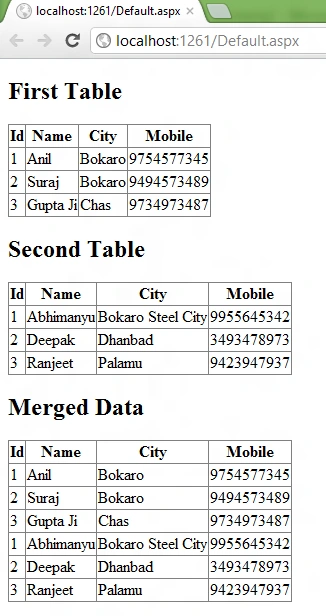
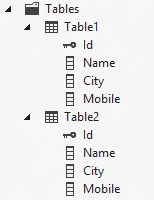
Table Structure
Code-behind (Default.aspx.cs)
using System;
using System.Collections.Generic;
using System.Configuration;
using System.Data;
using System.Data.SqlClient;
using System.Linq;
using System.Web;
using System.Web.UI;
using System.Web.UI.WebControls;
public partial class _Default : System.Web.UI.Page
{
protected void Page_Load(object sender, EventArgs e)
{
SqlConnection myConn = new SqlConnection(ConfigurationManager.ConnectionStrings["DatabaseConnectionString1"].ConnectionString);
DataSet ds1 = new DataSet();
DataSet ds2 = new DataSet();
SqlDataAdapter SqlDA = new SqlDataAdapter();
SqlDA = new SqlDataAdapter("SELECT * FROM Table1", myConn);
SqlDA.Fill(ds1, "MyTable");
SqlDA = new SqlDataAdapter("SELECT * FROM Table2", myConn);
SqlDA.Fill(ds2, "MyTable");
ds1.Merge(ds2);
GridView3.DataSource = ds1.Tables[0].DefaultView;
GridView3.DataBind();
}
}
Note: The name of the source table should be the same as in the above code, SqlDA.Fill(ds1, "MyTable");.
ASPX Page (Default.aspx)
<%@ Page Language="C#" AutoEventWireup="true" CodeFile="Default.aspx.cs" Inherits="_Default" %>
<!DOCTYPE html>
<html xmlns="http://www.w3.org/1999/xhtml">
<head runat="server">
<title></title>
</head>
<body>
<form id="form1" runat="server">
<h2>First Table</h2>
<div>
<asp:GridView ID="GridView1" runat="server" AutoGenerateColumns="False" DataKeyNames="Id" DataSourceID="SqlDataSource1"
EmptyDataText="There are no data records to display.">
<Columns>
<asp:BoundField DataField="Id" HeaderText="Id" ReadOnly="True" SortExpression="Id" />
<asp:BoundField DataField="Name" HeaderText="Name" SortExpression="Name" />
<asp:BoundField DataField="City" HeaderText="City" SortExpression="City" />
<asp:BoundField DataField="Mobile" HeaderText="Mobile" SortExpression="Mobile" />
</Columns>
</asp:GridView>
<asp:SqlDataSource ID="SqlDataSource1" runat="server" ConnectionString="<%$ ConnectionStrings:DatabaseConnectionString1 %>" DeleteCommand="DELETE FROM [Table1] WHERE [Id] = @Id" InsertCommand="INSERT INTO [Table1] ([Id], [Name], [City], [Mobile]) VALUES (@Id, @Name, @City, @Mobile)" ProviderName="<%$ ConnectionStrings:DatabaseConnectionString1.ProviderName %>" SelectCommand="SELECT [Id], [Name], [City], [Mobile] FROM [Table1]" UpdateCommand="UPDATE [Table1] SET [Name] = @Name, [City] = @City, [Mobile] = @Mobile WHERE [Id] = @Id">
<DeleteParameters>
<asp:Parameter Name="Id" Type="Int32" />
</DeleteParameters>
<InsertParameters>
<asp:Parameter Name="Id" Type="Int32" />
<asp:Parameter Name="Name" Type="String" />
<asp:Parameter Name="City" Type="String" />
<asp:Parameter Name="Mobile" Type="String" />
</InsertParameters>
<UpdateParameters>
<asp:Parameter Name="Name" Type="String" />
<asp:Parameter Name="City" Type="String" />
<asp:Parameter Name="Mobile" Type="String" />
<asp:Parameter Name="Id" Type="Int32" />
</UpdateParameters>
</asp:SqlDataSource>
</div>
<h2>Second Table</h2>
<div>
<asp:GridView ID="GridView2" runat="server" AutoGenerateColumns="False" DataKeyNames="Id" DataSourceID="SqlDataSource2" EmptyDataText="There are no data records to display.">
<Columns>
<asp:BoundField DataField="Id" HeaderText="Id" ReadOnly="True" SortExpression="Id" />
<asp:BoundField DataField="Name" HeaderText="Name" SortExpression="Name" />
<asp:BoundField DataField="City" HeaderText="City" SortExpression="City" />
<asp:BoundField DataField="Mobile" HeaderText="Mobile" SortExpression="Mobile" />
</Columns>
</asp:GridView>
<asp:SqlDataSource ID="SqlDataSource2" runat="server" ConnectionString="<%$ ConnectionStrings:DatabaseConnectionString1 %>" DeleteCommand="DELETE FROM [Table2] WHERE [Id] = @Id" InsertCommand="INSERT INTO [Table2] ([Id], [Name], [City], [Mobile]) VALUES (@Id, @Name, @City, @Mobile)" ProviderName="<%$ ConnectionStrings:DatabaseConnectionString1.ProviderName %>" SelectCommand="SELECT [Id], [Name], [City], [Mobile] FROM [Table2]" UpdateCommand="UPDATE [Table2] SET [Name] = @Name, [City] = @City, [Mobile] = @Mobile WHERE [Id] = @Id">
<DeleteParameters>
<asp:Parameter Name="Id" Type="Int32" />
</DeleteParameters>
<InsertParameters>
<asp:Parameter Name="Id" Type="Int32" />
<asp:Parameter Name="Name" Type="String" />
<asp:Parameter Name="City" Type="String" />
<asp:Parameter Name="Mobile" Type="String" />
</InsertParameters>
<UpdateParameters>
<asp:Parameter Name="Name" Type="String" />
<asp:Parameter Name="City" Type="String" />
<asp:Parameter Name="Mobile" Type="String" />
<asp:Parameter Name="Id" Type="Int32" />
</UpdateParameters>
</asp:SqlDataSource>
</div>
<h2>Merged Data</h2>
<div>
<asp:GridView ID="GridView3" runat="server"></asp:GridView>
</div>
</form>
</body>
</html>
Let me tell you one thing; there are a couple of ways by which you can achieve the same thing, even quickly.
We can also merge two DataTables or even DataRows. Here you go..
http://msdn.microsoft.com/en-us/library/system.data.dataset.merge%28v=vs.71%29.aspx
Join the conversation! Your thoughts help the community grow.