

Introduction
The Lunar (Hijri) calendar is very important for Muslims as is the Solar (Gregorian) calendar is important because the Lunar calendar was related to some elements of worship, so I looked at many sites on the internet to understand how to calculate the age of the moon in any given day, I found many sites offering various ways and I took what I found to provide results closer to the truth.
I've noticed that most sites agree on the expense of the Julian date but don't agree on how to calculate the age of the moon and found the difference between these sites to be up to one day and when the moon's age is 30 days, the result is zero in some sites.
In this program I calculate the approximate age of the moon in days and did not give attention to the parts of the day of the hours and minutes.
For the program to be more useful, I added a PictureBox control to display the lighted part of the moon and darkness part of the moon commensurate with the age of the moon.
There is a small probability of a one-day error for any calculation to convert a date.
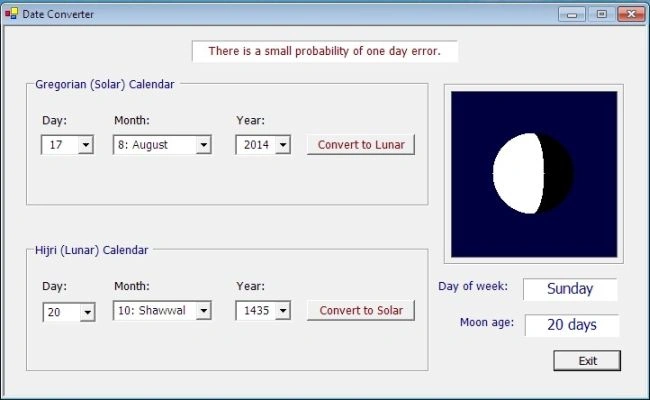
Note: You can read Months by its name or by its number.
Code
Best Calculation to Get Number Approximation
- Private Function getInt(ByRef fNumber As Double) As Double
- If fNumber < -0.0000001 Then
- getInt = Math.Ceiling(fNumber - 0.0000001)
- Else
- getInt = Math.Floor(fNumber + 0.0000001)
- End If
- End Function
Convert Solar (Gregorian) Date to Lunar (Hijri) Date
- Private Sub SolarToLunar()
- ' convert Solar year from 622 to 2500
- Dim jd As Double
- Dim j, L, n As Double
- Dim d, m, y As Integer
- Dim theDay As Integer
- ' Solar day
- d = Val(SolarDay.Text)
- 'get the number of Solar month
- m = SolarMonth.SelectedIndex + 1
- ' Solar year
- y = Val(SolarYear.Text)
- If (y > 1582) Or ((y = 1582) And (m > 10)) Or ((y = 1582) And (m = 10) And (d > 14)) Then
- jd = getInt((1461 * (y + 4800 + getInt((m - 14) / 12))) / 4) + getInt((367 * (m - 2 - 12 * (getInt((m - 14) / 12)))) / 12) - getInt((3 * (getInt((y + 4900 + getInt((m - 14) / 12)) / 100))) / 4) + d - 32075
- Else
- jd = 367 * y - getInt((7 * (y + 5001 + getInt((m - 9) / 7))) / 4) + getInt((275 * m) / 9) + d + 1729777
- End If
- ' Solar year >= 622
- If jd < 1948440 Then
- DateMinError()
- Exit Sub
- End If
- ' Solar year <= 2500
- If jd > 2621734 Then
- DateMaxError()
- Exit Sub
- End If
- 'day of the week
- theDay = jd Mod 7
- lblDay.Text = WeekDays(theDay)
- L = jd - 1948440 + 10632
- n = getInt((L - 1) / 10631)
- L = L - 10631 * n + 354
- j = (getInt((10985 - L) / 5316)) * (getInt((50 * L) / 17719)) + (getInt(L / 5670)) * (getInt((43 * L) / 15238))
- L = L - (getInt((30 - j) / 15)) * (getInt((17719 * j) / 50)) - (getInt(j / 16)) * (getInt((15238 * j) / 43)) + 29
- m = Int(getInt((24 * L) / 709))
- d = Int(L - getInt((709 * m) / 24))
- y = Int(30 * n + j - 30)
- ' display Lunar date
- LunarDay.Text = Str(d)
- LunarMonth.Text = LunarMonths(m - 1)
- LunarYear.Text = Str(y)
- ShowMoonPhase()
- If d = 1 Then
- lblAge.Text = Str(d) & " day"
- Else
- lblAge.Text = Str(d) & " days"
- End If
- End Sub
Convert Lunar (Hijri) Date to Solar (Gregorian) Date
- Private Sub LunarToSolar()
- ' convert Lunar year from 1 to 1900
- Dim jd As Double
- Dim i, j, k, L, n As Double
- Dim d, m, y As Integer
- Dim theDay As Integer
- ' Lunar day
- d = Val(LunarDay.Text)
- If d = 1 Then
- lblAge.Text = Str(d) & " day"
- Else
- lblAge.Text = Str(d) & " days"
- End If
- 'get the number of Lunar month
- m = LunarMonth.SelectedIndex + 1
- ' Lunar year
- y = Val(LunarYear.Text)
- jd = getInt((11 * y + 3) / 30) + 354 * y + 30 * m - getInt((m - 1) / 2) + d + 1948440 - 385
- 'day of the week
- theDay = jd Mod 7
- lblDay.Text = WeekDays(theDay)
- If jd > 2299160 Then
- L = jd + 68569
- n = getInt((4 * L) / 146097)
- L = L - getInt((146097 * n + 3) / 4)
- i = getInt((4000 * (L + 1)) / 1461001)
- L = L - getInt((1461 * i) / 4) + 31
- j = getInt((80 * L) / 2447)
- d = Int(L - getInt((2447 * j) / 80))
- L = getInt(j / 11)
- m = Int(j + 2 - 12 * L)
- y = Int(100 * (n - 49) + i + L)
- Else
- j = jd + 1402
- k = getInt((j - 1) / 1461)
- L = j - 1461 * k
- n = getInt((L - 1) / 365) - getInt(L / 1461)
- i = L - 365 * n + 30
- j = getInt((80 * i) / 2447)
- d = Int(i - getInt((2447 * j) / 80))
- i = getInt(j / 11)
- m = Int(j + 2 - 12 * i)
- y = Int(4 * k + n + i - 4716)
- End If
- ' display Solar date
- SolarDay.Text = Str(d)
- SolarMonth.Text = SolarMonths(m - 1)
- SolarYear.Text = Str(y)
- ShowMoonPhase()
- End Sub
Draw the Moon at Selected Date
- Private Sub ShowMoonPhase()
- Dim ag As Integer = Val(LunarDay.Text)
- Dim Phase As Double = ag / 29.530588853
- Dim Xpos, Ypos, Rpos As Integer
- Dim Xpos1, Xpos2 As Integer
- Me.ClearDraw() 'clear PicMoon PictureBox
- ' Width of 'ImageToDraw' Object = Width of 'PicMoon' control
- Dim PageWidth As Integer = Me.MoonShape.Width
- ' Height of 'ImageToDraw' Object = Height of 'PicMoon' control
- Dim PageHeight As Integer = Me.MoonShape.Height
- ' Initiate 'ImageToDraw' Object with size = size of control 'PicMoon' control
- Dim ImageToDraw As Bitmap = New Bitmap(PageWidth, PageHeight)
- 'Create graphics object for alteration.
- Dim newGraphics As Graphics = Graphics.FromImage(ImageToDraw)
- Dim PenW As Pen = New Pen(Color.White) ' For lighted part of the moon
- Dim PenB As Pen = New Pen(Color.Black) ' For darkness part of the moon
- For Ypos = 0 To 45
- Xpos = Int(Math.Sqrt(45 * 45 - Ypos * Ypos))
- ' Draw darkness part of the moon
- Dim pB1 As Point = New Point(90 - Xpos, Ypos + 90)
- Dim pB2 As Point = New Point(Xpos + 90, Ypos + 90)
- Dim pB3 As Point = New Point(90 - Xpos, 90 - Ypos)
- Dim pB4 As Point = New Point(Xpos + 90, 90 - Ypos)
- newGraphics.DrawLine(PenW, pB1, pB2)
- newGraphics.DrawLine(PenW, pB3, pB4)
- ' Determine the edges of the lighted part of the moon
- Rpos = 2 * Xpos
- If (Phase < 0.5) Then
- Xpos1 = -Xpos
- Xpos2 = Int(Rpos - 2 * Phase * Rpos - Xpos)
- Else
- Xpos1 = Xpos
- Xpos2 = Int(Xpos - 2 * Phase * Rpos + Rpos)
- End If
- ' Draw the lighted part of the moon
- Dim pW1 As Point = New Point(Xpos1 + 90, 90 - Ypos)
- Dim pW2 As Point = New Point(Xpos2 + 90, 90 - Ypos)
- Dim pW3 As Point = New Point(Xpos1 + 90, Ypos + 90)
- Dim pW4 As Point = New Point(Xpos2 + 90, Ypos + 90)
- newGraphics.DrawLine(PenB, pW1, pW2)
- newGraphics.DrawLine(PenB, pW3, pW4)
- Next
- ' Display the bitmap in the picture box.
- Me.MoonShape.Image = ImageToDraw
- ' Release graphics object
- PenW.Dispose()
- PenB.Dispose()
- newGraphics.Dispose()
- ImageToDraw = Nothing
- End Sub
You can go to the source file to read the code, if you have any idea or find another code to convert dates then please tell me:
Mostafa Kaisoun
[email protected]
Mostafa KaisounPosted Aug 21, 2014, 1:26 AM
Private Sub ShowMoonPhase() Dim ag As Integer = Val(LunarDay.Text) Dim Phase As Double = ag / 29.530588853 Dim Xpos, Ypos, Rpos As Integer Dim Xpos1, Xpos2 As Integer Dim Px, Py As Integer Dim randNum As Random = New Random Me.ClearDraw() 'clear PicMoon PictureBox ' Width of 'ImageToDraw' Object = Width of 'PicMoon' control Dim PageWidth As Integer = Me.MoonShape.Width ' Height of 'ImageToDraw' Object = Height of 'PicMoon' control Dim PageHeight As Integer = Me.MoonShape.Height ' Initiate 'ImageToDraw' Object with size = size of control 'PicMoon' control Dim ImageToDraw As Bitmap = New Bitmap(PageWidth, PageHeight) 'draw stars For i As Integer = 0 To 100 ' Randome Point: Px = randNum.Next(MoonShape.Width) Py = randNum.Next(MoonShape.Height) ImageToDraw.SetPixel(Px, Py, Color.White) Next 'Create graphics object for alteration. Dim newGraphics As Graphics = Graphics.FromImage(ImageToDraw) Dim PenW As Pen = New Pen(Color.White) ' For lighted part of the moon Dim PenB As Pen = New Pen(Color.Black) ' For darkness part of the moon For Ypos = 0 To 45 Xpos = Int(Math.Sqrt(45 * 45 - Ypos * Ypos)) ' Draw darkness part of the moon Dim pB1 As Point = New Point(90 - Xpos, Ypos + 90) Dim pB2 As Point = New Point(Xpos + 90, Ypos + 90) Dim pB3 As Point = New Point(90 - Xpos, 90 - Ypos) Dim pB4 As Point = New Point(Xpos + 90, 90 - Ypos) newGraphics.DrawLine(PenW, pB1, pB2) newGraphics.DrawLine(PenW, pB3, pB4) ' Determine the edges of the lighted part of the moon Rpos = 2 * Xpos If (Phase < 0.5) Then Xpos1 = -Xpos Xpos2 = Int(Rpos - 2 * Phase * Rpos - Xpos) Else Xpos1 = Xpos Xpos2 = Int(Xpos - 2 * Phase * Rpos + Rpos) End If ' Draw the lighted part of the moon Dim pW1 As Point = New Point(Xpos1 + 90, 90 - Ypos) Dim pW2 As Point = New Point(Xpos2 + 90, 90 - Ypos) Dim pW3 As Point = New Point(Xpos1 + 90, Ypos + 90) Dim pW4 As Point = New Point(Xpos2 + 90, Ypos + 90) newGraphics.DrawLine(PenB, pW1, pW2) newGraphics.DrawLine(PenB, pW3, pW4) Next ' Display the bitmap in the picture box. Me.MoonShape.Image = ImageToDraw ' Release graphics object PenW.Dispose() PenB.Dispose() newGraphics.Dispose() ImageToDraw = Nothing End Sub
Mostafa KaisounPosted Aug 21, 2014, 1:25 AM
You can display stars around the Moon, just replace the code of "ShowMoonPhase()" with following code: