

In this article we will provide step-by-step instructions for how to call your JavaScript function using a command button. We are using the RibbonWorkbench editor to create a command button.
You can download the RibbonWorkbench tool from here and import it your CRM organization by navigating Settings->Solutions->Import.
Let's first add our demo JavaScript function, use the following procedure.
Create a solution by navigating to Settings -> Solutions -> New and using the following settings:
- Name: Demo
- Publisher: Select default publisher of your organization
- Version: provide version number for example 1.0
- Click Save
Select Web Resources from the left components tree and click on New.
Fill in name and display name for your web resource and select Script (Jscript) under the Type dropdown.
Click on the Text Editor button and add a hello function as in the following:
- function Hello()
- {
- alert("This is custom button");
- }
Click on the Ok button and Save and Publish your web resource.
Let's say we want to add a custom command button on the account form, so let's add an account entity to our solution, use the following procedure to add an account entity to your solution:
- Select Entities and click on the Add Existing button
- Select Account entity from list and click on Ok
- Select “No, do not include Required Components” under Missing Required Components dialog and click Ok
- Now we need to open RibbonWorkBench tool to use our custom solution. Use the following procedure:
- Open the RibbonWorkBench solution and select our Demo solution
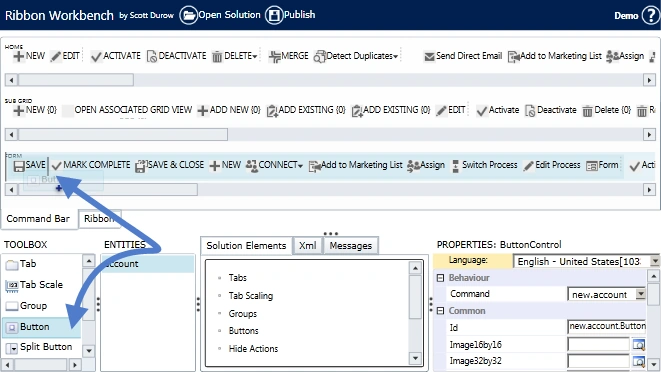
- Drag a button and leave it next to the Save button under Form as in the following:
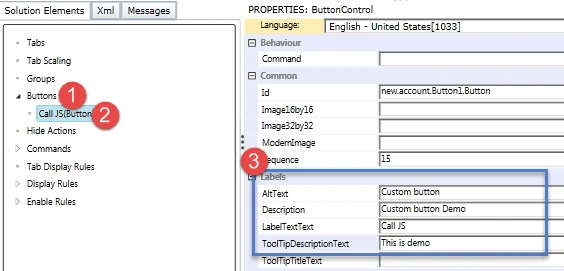
- Expend the button under Solution Elements and setup properties from the right hand section as in the following:
- Right-click on the Commands tree and select Add New
- Click on the Actions lookup and click on the Add button
- Select Javasript Funciton Action and click on Ok
- Use our Hello function and select our JavaScript web resource under library lookup and click on OK
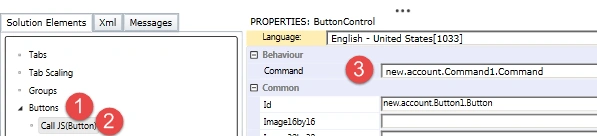
- Select our button again and associate a command with it as in the following:
- Click on the Publish button to publish all the changes.
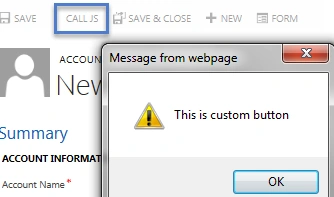
- Create a new account record or open an existing account, you should get your custom button and on a click of this button we should get an alert as in the following:
hemanth popuriPosted Mar 15, 2019, 9:35 AM
Hi, Mahender great post i'm trying to achieve a custom button which closes the phone call record button can be modified when required any javascript suggestions??