

Introduction
Here in this article, I am going to describe
"figure", "details" and "article" tag in Html 5. Now we will discuss each Tag one by one.
figure Tag
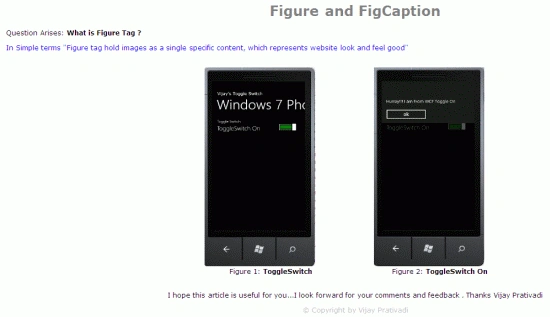
What is Figure Tag in Html 5?
- <!DOCTYPE html>
- <html lang="en">
- <head>
- <meta charset="utf-8" />
- <meta http-equiv="X-UA-Compatible" content="IE=edge,chrome=1" />
- <title>templates</title>
- <meta name="description" content="" />
- <meta name="author" content="Vijay" />
- <meta name="viewport" content="width=device-width; initial-scale=1.0" />
- <link rel="shortcut icon" href="/favicon.ico" />
- <link rel="apple-touch-icon" href="/apple-touch-icon.png" />
- </head>
- <body>
- <div>
- <header>
- <h1 align="center" style="font-family: Verdana; color: Gray">Figure and FigCaption</h1>
- </header>
- <div style="font-family: Verdana; font-size: 22">
- <p>
- Question Arises:
- <b>What is Figure Tag ?</b>
- </p>
- <p style="color: Blue">
- In Simple terms "Figure tag hold images as a single specific content, which represents website look and feel good"</p>
- </div>
- <div>
- <center>
- <table>
- <tr>
- <td>
- <figure style="font-family: Verdana; font-size: 22;">
- <img src="/C:\Users\Vijay\Documents\Toggle0.png" alt="hello" width="300"
- height="450"/>
- <figcaption style="text-align: center">Figure 1:
- <b> ToggleSwitch</b>
- </figcaption>
- </figure>
- </td>
- <td>
- <figure style="font-family: Verdana; font-size: 22">
- <img src="/C:\Users\Vijay\Documents\Toggle1.png" alt="hello" width="300"
- height="450"/>
- <figcaption style="text-align: center">Figure 2:
- <b> ToggleSwitch On</b>
- </figcaption>
- </figure>
- </td>
- </tr>
- </table>
- </center>
- <p style="text-align: center; font-family: Verdana; font-size: 22">
- I hope this article is useful for you...I look forward for your comments and feedback. Thanks Vijay Prativadi</p>
- </div>
- <footer>
- <p style="text-align: center; color: Silver; font-family: Verdana; font-size: 22" >© Copyright by Vijay Prativadi</p>
- </footer>
- </div>
- </body>
- </html>
Step 2: The Output of the Application looks like this:
details Tag
What is Details Tag in HTML 5?
- <!DOCTYPE html>
- <html lang="en">
- <head>
- <meta charset="utf-8" />
- <meta http-equiv="X-UA-Compatible" content="IE=edge,chrome=1" />
- <title>templates</title>
- <meta name="description" content="" />
- <meta name="author" content="Vijay" />
- <meta name="viewport" content="width=device-width; initial-scale=1.0" />
- <link rel="shortcut icon" href="/favicon.ico" />
- <link rel="apple-touch-icon" href="/apple-touch-icon.png" />
- </head>
- <body>
- <div>
- <header>
- <h1 style="text-align: center; color: Gray">Details tag - HTML 5</h1>
- </header>
- <div style="font-family: Verdana; font-size: 22">
- <details>
- <p>Question Arises:
- <b>What is Details Tag - Html 5</b>
- </p>
- <p style="color: Blue">In Simple terms "This tag provides an
- additional amount of information or hit that is requried to process some operation by the user. It can be viewed or hidden by user "</p>
- <p>
- <ul
- style="color:Red">
- <li>This Tag is only Supported in Google Chorme Browser!!</li>
- </ul>
- </p>
- </details>
- </div>
- <div style="text-align: center; font-family: Verdana; font-size: 22">
- <p>
- I hope this article is useful for you....I look forward for your comments and feedback....
- Thanks Vijay Prativadi</p>
- </div>
- <br>
- <footer>
- <p style="text-align:center;color: Silver; font-family: Verdana; font-size: 22">© Copyright by Vijay Prativadi</p>
- </footer>
- </div>
- </body>
- </html>
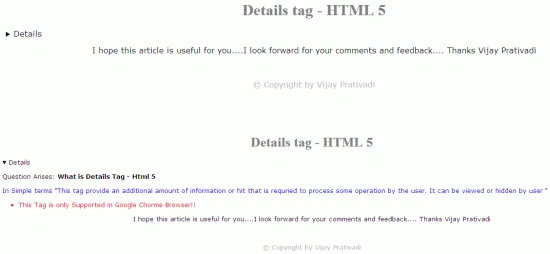
article Tag
This concept made life easier and customizable way
of working.
So, I think we all are now good to go and implement this concept.
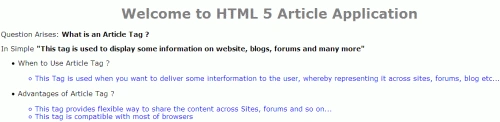
The Complete Code of Article.html looks like this:
- <!DOCTYPE html>
- <html lang="en">
- <head>
- <meta charset="utf-8" />
- <meta http-equiv="X-UA-Compatible" content="IE=edge,chrome=1" />
- <title>templates</title>
- <meta name="description" content="" />
- <meta name="author" content="Vijay" />
- <meta name="viewport" content="width=device-width; initial-scale=1.0" />
- <link rel="shortcut icon" href="/favicon.ico" />
- <link rel="apple-touch-icon" href="/apple-touch-icon.png" />
- </head>
- <body>
- <div style="font-family: Verdana; font-size: 22">
- <header style="text-align: center; color: Gray">
- <h1>Welcome to HTML 5 Article Application</h1>
- </header>
- <div>
- <article id="article1">
- <p>Question Arises:
- <b>What is an Article Tag ?</b>
- </p>
- <p>In Simple
- <b>"This tag is used to display some information on website, blogs, forums and many more"</b>
- </p>
- <ul>
- <li>When to Use Article Tag ?
- <ul>
- <br>
- <li style="color:Blue">This Tag is used when you want to deliver some interformation to the user, whereby representing it across sites, forums, blog etc... </li>
- </ul>
- </li>
- <br>
- <li> Advantages of Article Tag ?
- <ul style="color:Blue">
- <br>
- <li>This tag provides flexible way to share the content across Sites, forums and so on... </li>
- <li>This tag is compatible with most of browsers</li>
- </ul>
- </li>
- </ul>
- <br>
- <p style="text-align:center"> I hope this article is useful for you...I look forward for your comments and feedback....Thanks Vijay Prativadi</p>
- </article>
- </div>
- <footer style="text-align: center; color: Silver">
- <p>© Copyright by Vijay Prativadi</p>
- </footer>
- </div>
- </body>
- </html>

Former memberPosted Oct 11, 2012, 8:15 AM
Edit Hi This is really nice article . Please check the below more simple article as same.http://www.dotnetpools.com/Article/ArticleDetiail/?articleId=35&title=FieldSet%20Tag%20In%20HTML5
Arjun PanwarPosted Feb 6, 2012, 10:59 PM
Thanks for this article ,such for a great effort
Amit MaheshwariPosted Feb 6, 2012, 11:24 AM
It's great effort to do such task but images are not clear so take care of it and thanks for sharing.....................