

Introduction
First before we get begin working with a Toast prompt, we need to download the Coding4Fun Toolkit from http://coding4fun.codeplex.com/. Later add the Coding4Fun.Phone.Controls.dll as a reference for our newly created project.
Today, in this article let's learn another new concept related to Windows Phone 7, whereby communicating with WCF Service to perform some operation.
Question: What is a Toast Prompt?
In simple terms "It is used to display some message or notification to the user within some seconds and disappears automatically after message is shown. So this type of prompt enables to intimate the user with some concise information".
Let's get this started off now!!!
Step 1: The Complete Code of IService1.cs looks like this:
using System;
using System.Collections.Generic;
using System.Linq;
using System.Runtime.Serialization;
using System.ServiceModel;}
using System.ServiceModel.Web;
using System.Text;
namespace Toast_Prompt_WCF [OperationContract] [OperationContract] |
Step 2: The Complete Code of the Service1.svc.cs looks like this:
using System;
using System.Collections.Generic;
using System.Linq;
using System.Runtime.Serialization;
using System.ServiceModel;
using System.ServiceModel.Web;
using System.Text;
namespace Toast_Prompt_WCF public double add(double a, double b) public double mul(double a, double b) |
Step 3: The Complete Code of Web.Config looks like this:
<?xml version="1.0"?> <configuration> <system.web> </configuration> |
Step 4: The Complete Code of MainPage.xaml looks like this:
<phone:PhoneApplicationPage xmlns:my="clr-namespace:Coding4Fun.Phone.Controls;assembly=Coding4Fun.Phone.Controls"
    x:Class="ToastPromptApplication.MainPage"
    xmlns="http://schemas.microsoft.com/winfx/2006/xaml/presentation"
    xmlns:x="http://schemas.microsoft.com/winfx/2006/xaml"
    xmlns:phone="clr-namespace:Microsoft.Phone.Controls;assembly=Microsoft.Phone"
    xmlns:shell="clr-namespace:Microsoft.Phone.Shell;assembly=Microsoft.Phone"
    xmlns:d="http://schemas.microsoft.com/expression/blend/2008"
    xmlns:mc="http://schemas.openxmlformats.org/markup-compatibility/2006"
    mc:Ignorable="d" d:DesignWidth="480" d:DesignHeight="768"
    FontFamily="{StaticResource PhoneFontFamilyNormal}"
    FontSize="{StaticResource PhoneFontSizeNormal}"
    Foreground="{StaticResource PhoneForegroundBrush}"
    SupportedOrientations="Portrait" Orientation="Portrait"
    shell:SystemTray.IsVisible="True">
<!--LayoutRoot is the root grid where all page content is placed--> <!--TitlePanel contains the name of the application and page title--> <!--ContentPanel - place additional content here--> <!--Sample code showing usage of ApplicationBar--> </phone:PhoneApplicationPage> |
Step 5: The complete code of the MainPage.xaml.cs looks like this:
using System;
using System.Collections.Generic;
using System.Linq;
using System.Net;
using System.Windows;
using System.Windows.Controls;
using System.Windows.Documents;
using System.Windows.Input;
using System.Windows.Media;
using System.Windows.Media.Animation;
using System.Windows.Shapes;
using Microsoft.Phone.Controls;
using Coding4Fun.Phone.Controls;
using System.Windows.Media.Imaging;
using ToastPromptApplication.ServiceReference1;
namespace ToastPromptApplication private void add_ToastCall(object sender, addCompletedEventArgs e) } private void button1_Click(object sender, RoutedEventArgs e) } private void sub_ToastCall(object sender, subCompletedEventArgs e) } private void button2_Click(object sender, RoutedEventArgs e) } private void mul_ToastCall(object sender, mulCompletedEventArgs e) private void button3_Click(object sender, RoutedEventArgs e) private void div_ToastCall(object sender, divCompletedEventArgs e) } private void button4_Click(object sender, RoutedEventArgs e) |
Step 6: The output of the application looks like this:
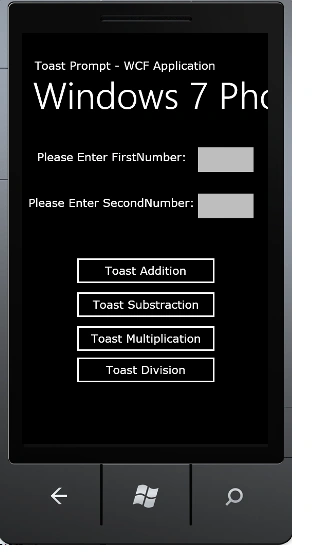
Step 7: The output of the Nothing Entered Application looks like this:
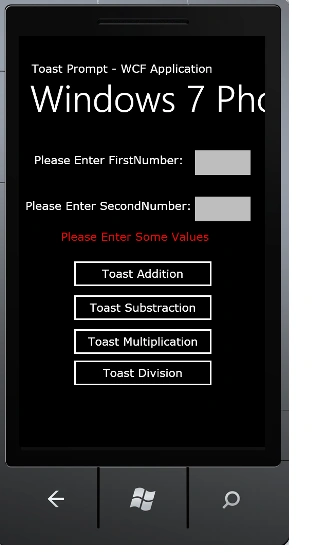
I hope this article is useful for you.
Join the conversation! Your thoughts help the community grow.