Today, in this article
let's see one of the interesting concept of how to make a call using Windows
Phone 7 with WCF Service.
So, I think we all are
good to go and implement this wonderful concept.
Let's get it started
off!!!
The Complete Code of
IService1.cs looks like this:
using
System;
using
System.Collections.Generic;
using
System.Linq;
using
System.Runtime.Serialization;
using
System.ServiceModel;
using
System.ServiceModel.Web;
using
System.Text;
namespace
WCF_WP7_Call_Application
{
// NOTE: You can use the "Rename" command on the "Refactor"
menu to change the interface name "IService1" in both code and config file
together.
[ServiceContract]
public interface
IService1
{
#region
WCF Operational Contracts
[OperationContract]
string Name(string
a);
[OperationContract]
int Number(int
a);
#endregion
}
}
The Complete Code of
Service1.svc looks like this:
using
System;
using
System.Collections.Generic;
using
System.Linq;
using
System.Runtime.Serialization;
using
System.ServiceModel;
using
System.ServiceModel.Web;
using
System.Text;
namespace
WCF_WP7_Call_Application
{
// NOTE: You can use the "Rename" command on the "Refactor"
menu to change the class name "Service1" in code, svc and config file together.
public class
Service1 : IService1
{
public
string Name(string
a)
{
return a;
}
public
int Number(int
a)
{
return a;
}
}
}
The Complete Code of
Web.Config looks like this:
<?xml
version="1.0"?>
<configuration>
<system.web>
<compilation
debug="true"
targetFramework="4.0"
/>
</system.web>
<system.serviceModel>
<behaviors>
<serviceBehaviors>
<behavior>
<!-- To avoid
disclosing metadata information, set the value below to false and remove the
metadata endpoint above before deployment
-->
<serviceMetadata
httpGetEnabled="true"/>
<!--
To receive exception details in faults for debugging purposes, set the value
below to true. Set to false before deployment to avoid disclosing exception
information -->
<serviceDebug
includeExceptionDetailInFaults="false"/>
</behavior>
</serviceBehaviors>
</behaviors>
<serviceHostingEnvironment
multipleSiteBindingsEnabled="true"
/>
</system.serviceModel>
<system.webServer>
<modules
runAllManagedModulesForAllRequests="true"/>
</system.webServer>
</configuration>
The Complete Code of
MainPage.xaml looks like this:
<phone:PhoneApplicationPage
x:Class="Windows_Phone_Call_Task.MainPage"
xmlns="http://schemas.microsoft.com/winfx/2006/xaml/presentation"
xmlns:x="http://schemas.microsoft.com/winfx/2006/xaml"
xmlns:phone="clr-namespace:Microsoft.Phone.Controls;assembly=Microsoft.Phone"
xmlns:shell="clr-namespace:Microsoft.Phone.Shell;assembly=Microsoft.Phone"
xmlns:d="http://schemas.microsoft.com/expression/blend/2008"
xmlns:mc="http://schemas.openxmlformats.org/markup-compatibility/2006"
mc:Ignorable="d"
d:DesignWidth="480"
d:DesignHeight="768"
FontFamily="{StaticResource
PhoneFontFamilyNormal}"
FontSize="{StaticResource
PhoneFontSizeNormal}"
Foreground="{StaticResource
PhoneForegroundBrush}"
SupportedOrientations="Portrait"
Orientation="Portrait"
shell:SystemTray.IsVisible="True">
<!--LayoutRoot
is the root grid where all page content is placed-->
<Grid
x:Name="LayoutRoot"
Background="Transparent">
<Grid.RowDefinitions>
<RowDefinition
Height="Auto"/>
<RowDefinition
Height="*"/>
</Grid.RowDefinitions>
<!--TitlePanel
contains the name of the application and page title-->
<StackPanel
x:Name="TitlePanel"
Grid.Row="0"
Margin="12,17,0,28">
<TextBlock
x:Name="ApplicationTitle"
Text="Vijay's WP7 Call
Application via WCF Service" Style="{StaticResource
PhoneTextNormalStyle}"/>
<TextBlock
x:Name="PageTitle"
Text="Windows 7 Phone"
Margin="9,-7,0,0" Style="{StaticResource
PhoneTextTitle1Style}"/>
</StackPanel>
<!--ContentPanel
- place additional content here-->
<Grid
x:Name="ContentPanel"
Grid.Row="1"
Margin="12,0,12,0">
<TextBox
Margin="123,106,113,430"
HorizontalAlignment="Center"
Width="220"
FontFamily="Verdana"
FontSize="22"
Name="textbox1"
/>
<TextBlock
Height="47"
HorizontalAlignment="Center"
Margin="123,53,92,0"
Name="textBlock1"
Text="Please Enter Name"
VerticalAlignment="Top"
Width="241"
FontFamily="Verdana"
FontSize="22"
/>
<TextBlock
Height="30"
HorizontalAlignment="Center"
Margin="123,234,92,0"
Name="textBlock2"
Text="Please Enter
Number" VerticalAlignment="Top"
Width="241"
FontFamily="Verdana"
FontSize="22"
/>
<TextBox
Height="72"
HorizontalAlignment="Center"
Margin="123,311,113,0"
Name="textBox2"
VerticalAlignment="Top"
Width="220"
FontFamily="Verdana"
FontSize="22"/>
<Button
Content="Call"
FontFamily="Verdana"
FontSize="22"
Height="72"
HorizontalAlignment="Center"
Margin="140,433,127,0"
Name="button1"
VerticalAlignment="Top"
Width="189"
Click="button1_Click"
/>
<TextBlock
Height="30"
HorizontalAlignment="Center"
FontFamily="Verdana"
FontSize="22"
Visibility="Collapsed"
Margin="92,551,74,26"
Name="textBlock3"
Text="TextBlock"
VerticalAlignment="Center"
Width="290"
/>
</Grid>
</Grid>
<!--Sample
code showing usage of ApplicationBar-->
<!--<phone:PhoneApplicationPage.ApplicationBar>
<shell:ApplicationBar
IsVisible="True" IsMenuEnabled="True">
<shell:ApplicationBarIconButton IconUri="/Images/appbar_button1.png"
Text="Button 1"/>
<shell:ApplicationBarIconButton IconUri="/Images/appbar_button2.png"
Text="Button 2"/>
<shell:ApplicationBar.MenuItems>
<shell:ApplicationBarMenuItem Text="MenuItem 1"/>
<shell:ApplicationBarMenuItem Text="MenuItem 2"/>
</shell:ApplicationBar.MenuItems>
</shell:ApplicationBar>
</phone:PhoneApplicationPage.ApplicationBar>-->
</phone:PhoneApplicationPage>
The Complete Code of
MainPage.xaml.cs looks like this:
using
System;
using
System.Collections.Generic;
using
System.Linq;
using
System.Net;
using
System.Windows;
using
System.Windows.Controls;
using
System.Windows.Documents;
using
System.Windows.Input;
using
System.Windows.Media;
using
System.Windows.Media.Animation;
using
System.Windows.Shapes;
using
Microsoft.Phone.Controls;
using
Windows_Phone_Call_Task.ServiceReference1;
using
Microsoft.Phone.Tasks;
namespace
Windows_Phone_Call_Task
{
public partial
class MainPage
: PhoneApplicationPage
{
// Constructor
public MainPage()
{
InitializeComponent();
}
static void
NameCall(object sender, NameCompletedEventArgs
e)
{
PhoneCallTask objDisplayName = new
PhoneCallTask();
objDisplayName.DisplayName = e.Result +
" via WCF Service";
objDisplayName.Show();
}
static void
NumberCall(object sender,
NumberCompletedEventArgs e)
{
PhoneCallTask objNumberTask = new
PhoneCallTask();
objNumberTask.PhoneNumber = e.Result.ToString() +
" via WCF Service";
objNumberTask.Show();
}
private
void button1_Click(object
sender, RoutedEventArgs e)
{
if
(textbox1.Text == "" || textBox2.Text ==
"")
{
textBlock3.Text = "Please Enter Some
Values";
textBlock3.Visibility = Visibility.Visible;
}
else
{
Service1Client objClient = new
Service1Client();
objClient.NameCompleted += new
EventHandler<NameCompletedEventArgs>(NameCall);
objClient.NameAsync(textbox1.Text);
objClient.NumberCompleted += new
EventHandler<NumberCompletedEventArgs>(NumberCall);
objClient.NumberAsync(Convert.ToInt32(textBox2.Text));
textbox1.Text = "";
textBox2.Text = "";
}
}
}
}
The Output of Application
looks like this:
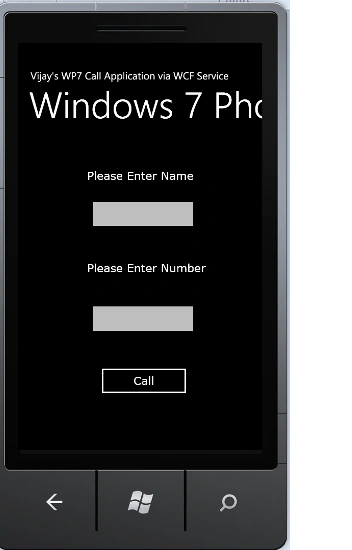
The Output of Application
after Call Button click looks like this:
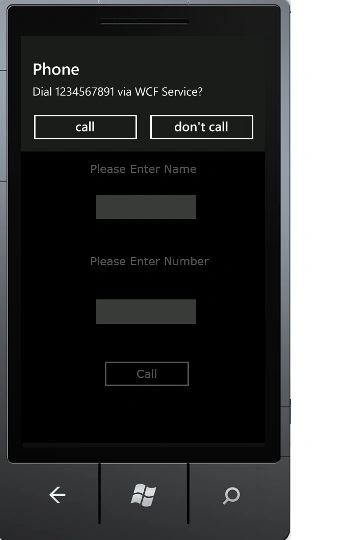
The Output of the
Application Calling Number looks like this:
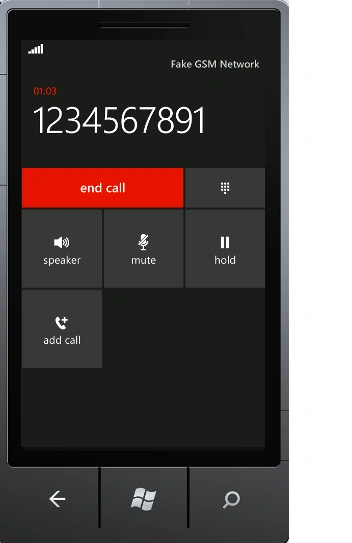
I hope this article is
useful for you.


Join the conversation! Your thoughts help the community grow.