

This article explains how to implement ASP.NET MVC validation using Fluent Validation. Fluent validation is a small validation library for .NET that uses a Fluent interface and lambda expressions for building validation rules for your business objects. Fluent validation is one way of setting up dedicated validator objects, that you would use when you want to treat validation logic as separate from business logic. The Aspect-Oriented Programming (AOP) paradigm enables separation of cross-cutting concerns within a system, and validation is one such concern. Separating validation helps clean up your domain code and make it more cohesive, as well as giving you a single place to look for validation logic.
I have explained other techniques in my previous two articles. These are:
ASP.NET MVC Server-Side Validation
ASP.NET MVC Client-Side Validation
I create a Customer model (Customer class under Models folder) that has two properties, one is "Email" and another is "Name" as in the following code snippet:
- namespace MvcValidation.Models
- {
- public class Customer
- {
- public string Name { get; set; }
- public string Email { get; set; }
- }
- }
Now I install the Fluent validation Nuget package in the application so I can use Fluent validation rules.
Figure 1.1 Install FluentValidation NuGet package
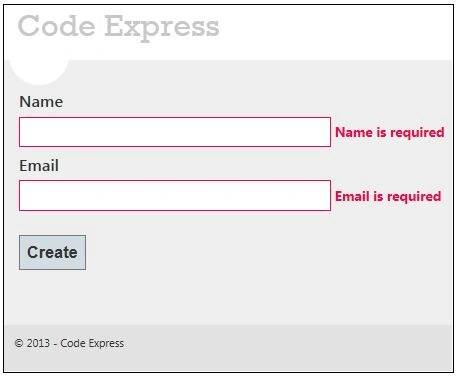
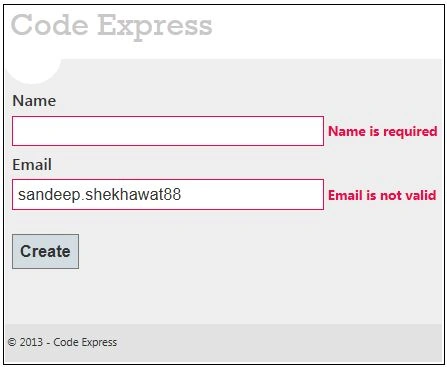
After that I create a validator class for the Customer model under the "Validators" folder but you can create it anywhere in an application for validation rules on Customer properties. I used two rules, one is not empty and another validates an email address.
- using FluentValidation;
- using MvcValidation.Models;
- namespace MvcValidation.Validators
- {
- public class CustomerValidator : AbstractValidator<Customer>
- {
- public CustomerValidator()
- {
- RuleFor(x => x.Name).NotEmpty().WithMessage("Name is required");
- RuleFor(x => x.Email).NotEmpty().WithMessage("Email is required");
- RuleFor(x => x.Email).EmailAddress().WithMessage("Email is not valid");
- }
- }
- }
After that, you need to create a controller's action methods; these render views on the UI and binds a model with the view. So let's create a controller with two action methods; these handle both request types (GET and POST) respectively.

Tuğba SivriPosted Feb 25, 2021, 5:08 PM
Hi. Great article thank you. I am using fluent validation for Server side validation. I combine it with castle dynamic proxy and they work perfectly. But when i try to use also for client side validation it throws ambiguous match found error. Do you know anything about it. Thank you.
Pradeep SahooPosted Jun 2, 2016, 9:47 PM
Hi Sandeep, Thanks for writting Fluent validation . While running I get the error Could not load type 'FluentValidation.AbstractValidator`1' from assembly 'FluentValidation, Version=1.0.0.0, Culture=neutral, PublicKeyToken=null'. .I am using Visual studio 2013 web express , checked these dlls Microsoft.Web.InfrastructureSystem.Web.Razor System.Web.WebPages.Deployment System.Web.WebPages.Razor and looks good . what could be the issue ?
Saineshwar BageriPosted Apr 1, 2015, 1:18 AM
Nice one sir i too going to write on this