

Introduction
This article explains how to bind the data to a GridView with Image and Fileupload Controls using TemplateFields.
Description
A GridView is a databound control for displaying and manipulating data in web applications. A GridView displays data in tabular format, in other words a collection of rows and columns. Here each row represents one record and each column represents one field in a database table.
In a GridView each column is represented by one TemplateField, each TemplateField can contain a HeaderTemplate, ItemTemplate, EditItemTemplate and FooterTemplate.
- HeaderTemplate: It renders only once, used to display header text for a column.
- ItemTemplate: It renders as many records/rows as are in the Datasource collection. Used to display data.
- EditItemTemplate: It is allows you to edit the text.
- FooterTemplate: It renders only once, used to display footer text.
Frequently used Events
The following are frequently used events:
- OnRowEditing: It will be raised when button with CommandName=”Edit” is clicked.
- OnRowUpdating: It will be raised when button with CommandName=”Update” is clicked.
- OnRowDeleting: It will be raised when button with CommandName=”Delete” is clicked.
- OnRowCanceling: It will be raised when button with CommandName=”Cancel” is clicked.
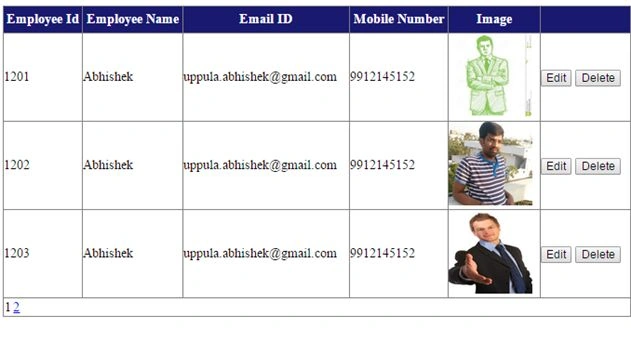
The following is an example to show the GridView with Edit, Cancel, Update, Delete and Pagination using TemplateFields.
| Column Name | Data Type |
| EmpId | Int |
| EmpName | Varchar(50) |
| EmpEmailId | Varchar(50) |
| EmpMobileNum | Bigint |
| EmpImage | Varchar(256) |
Set the ConnectionString in web.config as in the following:
- <connectionStrings>
- <add name="myconnection" connectionString="Data Source=ABHI-PC\SQLEXPRESS;Initial Catalog=Articles;Integrated Security=True"
- providerName="System.Data.SqlClient" />
- </connectionStrings>
- <%@ Page Language="C#" AutoEventWireup="true" CodeFile="Default.aspx.cs" Inherits="_Default" %>
- <!DOCTYPE html>
- <html
- xmlns="http://www.w3.org/1999/xhtml">
- <head runat="server">
- <title></title>
- <style>
- .hdrow {
- text-align:center;
- color:White;
- background-color:midnightblue;
- height:30px;
- }
- .gridview
- {
- width:50%;
- background-color:white;
- margin:0px auto;
- }
- </style>
- </head>
- <body>
- <form id="form1" runat="server">
- <div>
- <asp:GridView ID="gv1" runat="server" AutoGenerateColumns="false" OnRowEditing="gv1_RowEditing" OnRowUpdating="gv1_RowUpdating" OnRowCancelingEdit="gv1_RowCancelingEdit" OnRowDeleting="gv1_RowDeleting" CssClass="gridview" OnPageIndexChanging="gv1_PageIndexChanging" PageSize="3" AllowPaging="true">
- <Columns>
- <asp:TemplateField>
- <HeaderStyle CssClass="hdrow" />
- <HeaderTemplate>
- <asp:Label ID="hlbleid" runat="server" Text="Employee Id"></asp:Label>
- </HeaderTemplate>
- <ItemTemplate>
- <asp:Label ID="lbleid" runat="server" Text='<%# Eval("EmpId") %>'>
- </asp:Label>
- </ItemTemplate>
- </asp:TemplateField>
- <asp:TemplateField>
- <HeaderStyle CssClass="hdrow" />
- <HeaderTemplate>
- <asp:Label ID="hlblename" runat="server" Text="Employee Name"></asp:Label>
- </HeaderTemplate>
- <ItemTemplate>
- <asp:Label ID="lblename" runat="server" Text='<%# Eval("EmpName") %>'>
- </asp:Label>
- </ItemTemplate>
- <EditItemTemplate>
- <asp:TextBox ID="txtename" runat="server" Text='<%# Eval("EmpName") %>'>
- </asp:TextBox>
- </EditItemTemplate>
- </asp:TemplateField>
- <asp:TemplateField>
- <HeaderStyle CssClass="hdrow" />
- <HeaderTemplate>
- <asp:Label ID="hlblemid" runat="server" Text="Email ID"></asp:Label>
- </HeaderTemplate>
- <ItemTemplate>
- <asp:Label ID="lblemid" runat="server" Text='<%# Eval("EmpEmailId") %>'>
- </asp:Label>
- </ItemTemplate>
- <EditItemTemplate>
- <asp:TextBox ID="txtemid" runat="server" Text='<%# Eval("EmpEmailId") %>'>
- </asp:TextBox>
- </EditItemTemplate>
- </asp:TemplateField>
- <asp:TemplateField>
- <HeaderStyle CssClass="hdrow" />
- <HeaderTemplate>
- <asp:Label ID="hempnumber" runat="server" Text="Mobile Number"></asp:Label>
- </HeaderTemplate>
- <ItemTemplate>
- <asp:Label ID="lblmnumber" runat="server" Text='<%# Eval("EmpMobileNum") %>'>
- </asp:Label>
- </ItemTemplate>
- <EditItemTemplate>
- <asp:TextBox ID="txtmnumber" runat="server" Text='<%# Eval("EmpMobileNum") %>'>
- </asp:TextBox>
- </EditItemTemplate>
- </asp:TemplateField>
- <asp:TemplateField>
- <HeaderStyle CssClass="hdrow" />
- <HeaderTemplate>
- <asp:Label ID="hlblimg" runat="server" Text="Image"></asp:Label>
- </HeaderTemplate>
- <ItemTemplate>
- <asp:Image ID="img1" runat="server" ImageUrl='
- <%# "~/Images/"+Eval("EmpImage") %>' Height="100px" Width="100px" />
- </ItemTemplate>
- <EditItemTemplate>
- <asp:FileUpload ID="fu1" runat="server" />
- </EditItemTemplate>
- </asp:TemplateField>
- <asp:TemplateField>
- <HeaderStyle CssClass="hdrow" />
- <ItemTemplate>
- <asp:Button ID="btnedit" runat="server" Text="Edit" CommandName="Edit" />
- <asp:Button ID="btndelete" runat="server" Text="Delete" CommandName="Delete" />
- </ItemTemplate>
- <EditItemTemplate>
- <asp:Button ID="btnupdate" runat="server" Text="Update" CommandName="Update" />
- <asp:Button ID="btnDelete" runat="server" Text="Delete" CommandName="Delete" />
- </EditItemTemplate>
- </asp:TemplateField>
- </Columns>
- </asp:GridView>
- </div>
- </form>
- </body>
- </html>
- using System;
- using System.Collections.Generic;
- using System.Linq;
- using System.Web;
- using System.Web.UI;
- using System.Web.UI.WebControls;
- using System.Data.SqlClient;
- using System.Data;
- using System.Web.Configuration;
- public partial class _Default: System.Web.UI.Page
- {
- SqlConnection con = new SqlConnection(WebConfigurationManager.ConnectionStrings["connection1"].ConnectionString);
- protected void Page_Load(object sender, EventArgs e)
- {
- if (!IsPostBack)
- {
- Bind();
- }
- }
- public void Bind()
- {
- SqlCommand cmd = new SqlCommand("select * from Employee", con);
- SqlDataAdapter da = new SqlDataAdapter(cmd);
- DataSet ds = new DataSet();
- da.Fill(ds, "Employee");
- gv1.DataSource = ds;
- gv1.DataBind();
- }
- protected void gv1_RowEditing(object sender, GridViewEditEventArgs e)
- {
- gv1.EditIndex = e.NewEditIndex;
- Bind();
- }
- protected void gv1_RowUpdating(object sender, GridViewUpdateEventArgs e)
- {
- int index = e.RowIndex;
- GridViewRow row = (GridViewRow) gv1.Rows[index];
- Label eid = (Label) row.FindControl("lbleid");
- TextBox ename = (TextBox) row.FindControl("txtename");
- TextBox emid = (TextBox) row.FindControl("txtemid");
- TextBox mnumber = (TextBox) row.FindControl("txtmnumber");
- FileUpload fu = (FileUpload) row.FindControl("fu1");
- if (fu.HasFile)
- {
- string file = System.IO.Path.Combine(Server.MapPath("~/Images/"), fu.FileName);
- fu.SaveAs(file);
- SqlCommand cmd = new SqlCommand("update Employee set EmpImage = '" + fu.FileName + "' where EmpId=" + Convert.ToInt32(eid.Text) + "", con);
- con.Open();
- int res = cmd.ExecuteNonQuery();
- con.Close();
- }
- SqlCommand cmd1 = new SqlCommand("update Employee set EmpName='" + ename.Text + "',EmpEmailId='" + emid.Text + "',EmpMobileNum=" + Convert.ToInt64(mnumber.Text) + "", con);
- con.Open();
- int res1 = cmd1.ExecuteNonQuery();
- con.Close();
- if (res1 == 1)
- {
- Response.Write("<script>alert('Updation done!')</script>");
- }
- gv1.EditIndex = -1;
- Bind();
- }
- protected void gv1_RowCancelingEdit(object sender, GridViewCancelEditEventArgs e)
- {
- gv1.EditIndex = -1;
- Bind();
- }
- protected void gv1_RowDeleting(object sender, GridViewDeleteEventArgs e)
- {
- int index = e.RowIndex;
- GridViewRow row = (GridViewRow) gv1.Rows[index];
- Label eid = (Label) row.FindControl("lbleid");
- SqlCommand cmd = new SqlCommand("delete from Employee where EmpId=" + Convert.ToInt32(eid.Text) + "", con);
- con.Open();
- int res = cmd.ExecuteNonQuery();
- con.Close();
- if (res == 1)
- {
- Response.Write("<script>alert('Deletion done!')</script>");
- }
- Bind();
- }
- protected void gv1_PageIndexChanging(object sender, GridViewPageEventArgs e)
- {
- gv1.PageIndex = e.NewPageIndex;
- Bind();
- }
- }
Aktham MahmoudPosted Sep 26, 2019, 5:27 AM
Thanks, but how I can make insert mode, as update row command,,I'm trying with that
Ajeet MishraPosted Nov 4, 2015, 1:39 AM
Nice
Karthik Muthu KaruppanPosted Apr 23, 2015, 11:20 AM
good one
Abhishek UppulaPosted Apr 23, 2015, 12:36 AM
Thank you!
Nihal AhmedPosted Apr 23, 2015, 12:02 AM
nice one
Rahul Kumar SaxenaPosted Apr 22, 2015, 2:31 PM
Good Show..
Amal SalahPosted Apr 22, 2015, 1:04 PM
that is very good so thanks
NitinPosted Apr 22, 2015, 5:49 AM
Good one
Gowtham RajamanickamPosted Apr 21, 2015, 11:27 PM
good on
Santhakumar MunuswamyPosted Apr 21, 2015, 10:17 PM
Thanks for nice article
Krishnanand SivarajPosted Apr 21, 2015, 10:06 PM
Thanks for sharing