

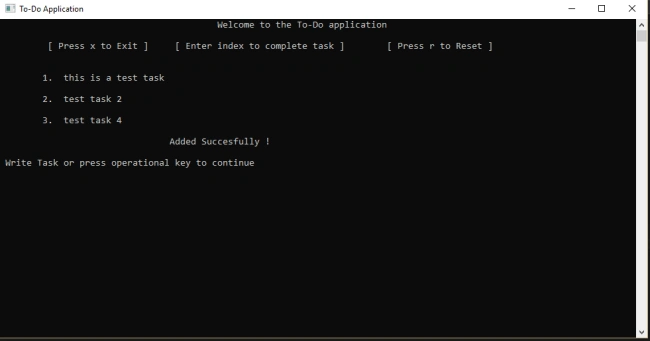
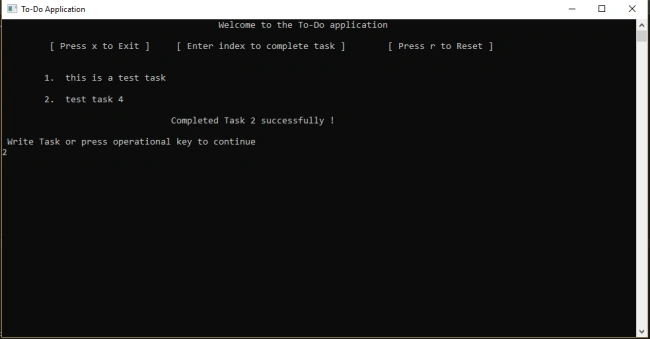
We will develop a console application which could have a friendly UX and persistent data storage. In this beginner project, we will demonstrate various object-oriented programming features and list manipulations along with file handling. Our end project would something like this.
First, create a new console application and name it, such as - to-do app.
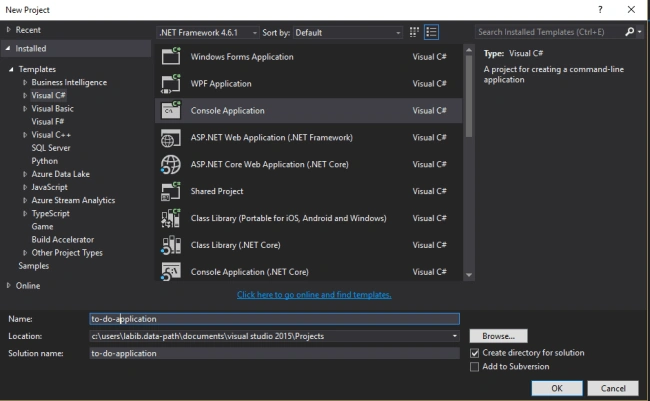
A new project will start. First, we will start off by creating the persistent data communication layer. For this, we are maintaining a file where our to-do task would be stored. We will create a class named DataPersistence for that.
- public class DataPersistence
- {
- //constructor which would make the file if the file does not exist
- public DataPersistence()
- {
- if (!File.Exists(fileName))
- {
- File.Create(fileName);
- }
- }
- //the file would be stored at the base directory
- string fileName = AppDomain.CurrentDomain.BaseDirectory + "/app-data.txt";
- //Function for loading up the data
- public List<string> loadData()
- {
- return System.IO.File.ReadAllLines(fileName).ToList();
- }
- //adding new task on my list
- public bool addData(string model)
- {
- try
- {
- using (System.IO.StreamWriter file =
- new System.IO.StreamWriter(fileName, true))
- {
- file.WriteLine(model);
- }
- return true;
- }
- catch (Exception)
- {
- throw;
- }
- }
- //reseting the whole list
- public bool resetList()
- {
- File.WriteAllText(fileName, string.Empty);
- return true;
- }
- //complete the task or remove the task from the list
- internal bool completeTask(string selectedTask)
- {
- try
- {
- var lines = File.ReadAllLines(fileName).Where(line => line.Trim() != selectedTask.Trim()).ToArray();
- File.WriteAllLines(fileName, lines);
- return true;
- }
- catch (Exception e)
- {
- return false;
- }
- }
- }
We now need to access this data from our application. For that, we create our class ToDoApp. It is advisable to separate the data layer and the application layer. This would create an instance of the DataPersistence class and all the functions will first perform operations on the local list then will move on to the file operations.
- public class ToDoApp
- {
- private List<string> toDoList = new List<string>();
- DataPersistence dp = new DataPersistence(); //creating an instance of dataPersistence class
- public List<string> fetchData()
- {
- //loading the data from the file
- toDoList = dp.loadData();
- return toDoList;
- }
- //its time to add new task to our list
- public bool addData(string model)
- {
- try
- {
- if (model == null || model == "")
- {
- return false;
- }
- toDoList.Add(model);
- dp.addData(model);
- return true;
- }
- catch (Exception e)
- {
- return false;
- }
- }
- //user might want to reset the whole list
- public bool resetList()
- {
- try
- {
- toDoList.Clear();
- return dp.resetList();
- }
- catch (Exception e)
- {
- throw;
- }
- }
- //to complete or delete the task from our to-do list
- internal bool completeTask(string userInput)
- {
- try
- {
- toDoList = dp.loadData();
- int index = Convert.ToInt32(userInput) -1;
- if (index <= toDoList.Count)
- {
- string selectedTask = toDoList.ElementAt(index);
- toDoList.Remove(selectedTask);
- return dp.completeTask(selectedTask);
- }
- return false;
- }
- catch (Exception e)
- {
- return false;
- }
- }
- }
These classes are standalone classes. We need to access these from our main class.
- class Program
- {
- static void Main(string[] args)
- {
- Console.Title = "To-Do Application"; //creating a title for our application
- fetchData();
- Console.ReadLine();
- }
- private static void fetchData(string message = null)
- {
- Console.Clear();
-
- //N.B : We would never access the data accessing class from this main class.
- ToDoApp app = new ToDoApp(); //creating an instance of the middle layer
- List<string> list = app.fetchData();
- Console.WriteLine("\t \t \t \t \t Welcome to the To-Do application \n");
- Console.WriteLine("\t [ Press x to Exit ] \t [ Enter index to complete task ] \t [ Press r to Reset ] \n \n");
- int num = 1;
- foreach(string text in list)
- {
- Console.WriteLine("\t" + num.ToString() + ". " + text + "\n"); //for displaying the data from the list
- num++;
- }
- if(message!="" && message!= null)
- {
- Console.WriteLine("\t \t \t \t"+message);
- }
- Console.WriteLine("\n Write Task or press operational key to continue");
- string userInput = Console.ReadLine(); //awaiting user input
- switchTask(userInput);
- }
- //A function to operate differently on the basis of user input
- private static void switchTask(string userInput)
- {
- ToDoApp app = new ToDoApp();
- switch (userInput.ToLower())
- {
- case "x": //to exit the console
- Console.Clear();
- Environment.Exit(0);
- break;
- case "r":
- app.resetList();
- fetchData("Reset succesfull !");
- break;
- default:
- int index;
- bool isNumeric = int.TryParse(userInput, out index);
- if (!isNumeric)
- {
- app.addData(userInput);
- fetchData("Added Succesfully !");
- }
- else
- {
- bool isOkay = app.completeTask(userInput);
- if (isOkay)
- fetchData(@"Completed Task "+ userInput + " successfully !");
- else
- fetchData(@"No task at " + userInput + " !");
- }
- break;
- //Note that after every operation we are returning it back to the fetchData() function with a feedback message. This would allow the user to re-enter as much as they want.
- }
- }
- }
Join the conversation! Your thoughts help the community grow.