

HTML Text Editor
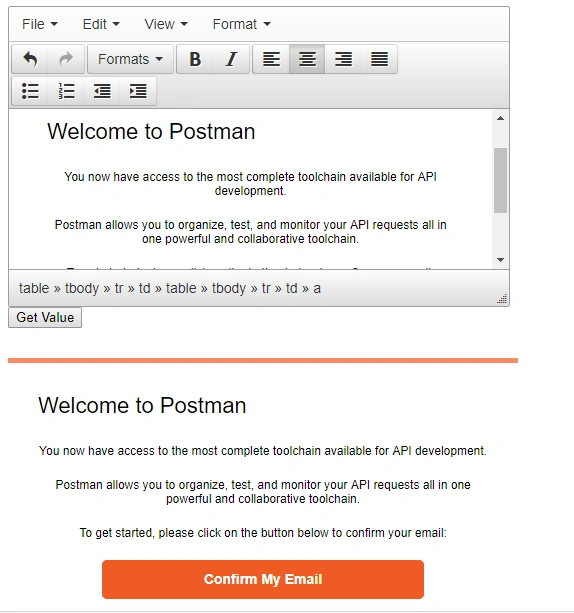
In this blog, we will explain the use of HTML Text Editor in ASP.NET by using TinyMCE RichTextBox plugin.
Step 1
First of all, add a Web application and name it "Web Application".
Step 2
Now, in this application we will add a textarea, one button, and a div.
- <div>
- <textarea id="txtarea"></textarea>
- <input type="button" id="btnValue" value="Get Value" />
- <div id="divkarea"></div>
Step 3
Now, add JQuery Link and Tinymce link.
- < script src = "https://code.jquery.com/jquery-3.3.1.min.js" > < /script> <
- script type = "text/javascript"
- src = "//tinymce.cachefly.net/4.0/tinymce.min.js" > < /script>
Step 4
Now, add Tinymce function To make Textarea as Editor.
- < script type = "text/javascript" >
- tinymce.init({
- selector: 'textarea',
- width: 500
- }); <
- /script>
Step 5
Now, add jQuery function to Textarea content and add to div.
- $(document).ready(function() {
- $('#btnValue').click(function() {
- $("#divkarea").html("");
- var content = tinymce.get("txtarea").getContent();
- $("#divkarea").html(content);
- });
- });
Kolade IgePosted Apr 28, 2020, 7:06 AM
This was very helpful. Thank you.
Hadshana KamalanathanPosted Jul 21, 2018, 11:06 PM
Thanks for sharing
Gajendra JangidPosted Mar 20, 2018, 4:16 AM
Thank for publish my Blog....