

In this post, we will learn how to calculate the time between two dates in year, month, and day format. There is a special function for getting a perfect year, month, and day count.
Normally, we use the DATEDIFF function of SQL for getting the years, months, and days between two dates but this function returns a perfect difference between the dates. Let's start creating this function.
Write the below code to create a function in the existing SQL database.
- CREATE FUNCTION Get_YearMonthDayCount_Custom
- (
- @FromDate DateTime
- ,@ToDate DateTime
- )
- RETURNS Varchar(100)
- AS
- BEGIN
- DECLARE @Year Int = 0, @Month Int = 0, @Day Int = 0, @Date DateTime, @ReturnValue Int = 0
- SET @Date = @FromDate
- --CALCULATE THE @YEAR
- IF(DATEPART(YEAR,@ToDate)>DATEPART(YEAR,@FromDate))
- BEGIN
- SET @Year = DATEDIFF(YEAR,@FromDate,@ToDate)
- SET @Date = DATEADD(YEAR,@Year,@FromDate) --UPDATE RUNNINGDATE
- IF(@Date>@ToDate)
- BEGIN
- SET @Year = DATEDIFF(YEAR,@FromDate,DATEADD(YEAR,-1,@ToDate)) --CALCULATE YEARS FROM @FROMDATE TO @TODATE - 1 YEAR
- SET @Date = DATEADD(YEAR,@Year,@FromDate) --UPDATE RUNNINGDATE
- END
- END
- --ADD 1 MONTH AS LONG AS RUNNING DATE IS SMALLER THAN OR EQUAL TO @TODATE
- WHILE @Date<=@ToDate
- BEGIN
- SET @Date = DATEADD(MONTH,1,@Date)
- IF (@Date<=@ToDate)
- BEGIN
- SET @Month=@Month+1
- END
- END
- --SET @DATE BACK 1 MONTH
- SET @Date=DATEADD(MONTH,-1,@Date)
- --START TO COUNT DAYS
- WHILE @Date<@ToDate
- BEGIN
- SET @Date=DATEADD(DAY,1,@Date)
- SET @Day=@Day+1
- END
- RETURN CONCAT(CONVERT(NVARCHAR(10),@Year),' Year ',CONVERT(NVARCHAR(10),@Month),' Month ',CONVERT(NVARCHAR(10),@Day),' Day')
- END
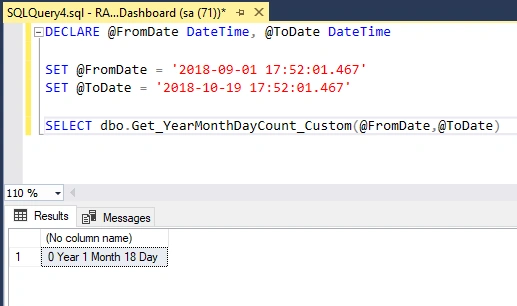
- DECLARE @FromDate DateTime, @ToDate DateTime
- SET @FromDate = '2018-09-01 17:52:01.467'
- SET @ToDate = '2018-10-19 17:52:01.467'
- SELECT dbo.Get_YearMonthDayCount_Custom(@FromDate,@ToDate)
Rajesh KumarPosted Oct 25, 2018, 11:20 PM
Nice article, Thanks for sharing...........................