

This blog will tell you how to get the title of the selected column in Kendo Grid using the column index in the change event.
kendoGrid.html
- <!DOCTYPE html>
- <html>
- <head>
- <meta charset="utf-8">
- <title>Untitled</title>
- <style>
- html
- { font-size: 14px; font-family: Arial, Helvetica, sans-serif; }
- .messageArea
- {
- margin-top:22px
- }
- #message
- {
- color:orange;
- }
- </style>
- <title></title>
- <link rel="stylesheet" href="https://kendo.cdn.telerik.com/2018.1.221/styles/kendo.common.min.css" />
- <link rel="stylesheet" href="https://kendo.cdn.telerik.com/2018.1.221/styles/kendo.highcontrast.min.css" />
- <link rel="stylesheet" href="https://kendo.cdn.telerik.com/2018.1.221/styles/kendo.highcontrast.mobile.min.css" />
- <script src="https://kendo.cdn.telerik.com/2018.1.221/js/jquery.min.js"></script>
- <script src="https://kendo.cdn.telerik.com/2018.1.221/js/kendo.all.min.js"></script>
- <body>
- <h3>Kendo Grid </h3>
- <div id="grid"></div>
- <div class="messageArea">
- Selected Cell Column Name : <label type="text" class="form-control" id="message">
- <div>
- <script>
- $(document).ready(function()
- {
- dataSource = new kendo.data.DataSource({
- data:[{ ProductID:1, productName: "Tea", category: "Beverages" },
- { ProductID:2, productName: "Coffee", category: "Beverages" },
- { ProductID:3, productName: "Ham", category: "Food" },
- { ProductID:4, productName: "Bread", category: "Food" } ],
- schema:{
- model:{
- id:"ProductID",
- fields:{
- ProductID:{editable:false,nullable:true},
- productName:{editable:true},
- Category:{editable:true}
- },
- }
- },
- })
- $("#grid").kendoGrid({
- dataSource: dataSource,
- selectable: "cell",
- allowCopy: true,
- editable:true,
- navigatable:true,
- change: onChange,
- columns: [
- { field: "productName", title:"Product Name" },
- { field: "category",title:"Category"}
- ],
- });
- });
- function onChange(e)
- {
- var grid = $("#grid").data("kendoGrid");
- var colIdx = grid.select().closest("td").index();
- var columnheader= this.options.columns[colIdx].title;
- $("#message").text(columnheader);
- }
- </script>
- </body>
- </html>
We need a column index detail to get the name of the column which is selected. We will use the change event in the grid which will trigger while the column gets selected.
- select() will give the information about the selected cell in grid.
- grid.select().closest("td").index() -> will give the index detail of the selected cell.
- this.options.columns[colIdx].title -> will give the selected cell column title.
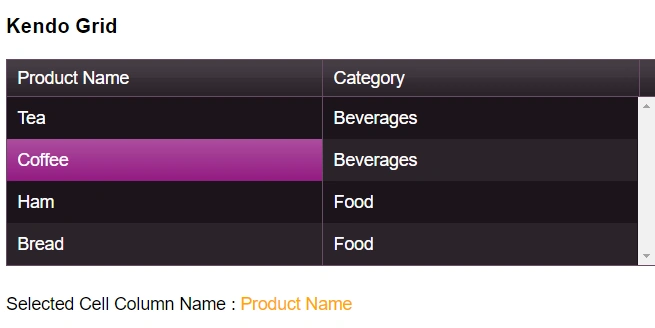
Result
Join the conversation! Your thoughts help the community grow.