

In this Article we can Send Multiple Email with the Attachment File at the same time and SMPT using ASP.NET and C#.
The .NET Framework makes the task of sending email from a web page easy. In this article send the multiple email throw the database.
And namespace is
using System.Net.Mail;
using System.Data.SqlClient;
This is ASPX code: -
<%@ Page Language="C#" AutoEventWireup="true" CodeFile="MultipleMailSend.aspx.cs"
Inherits="sapnamalik_MultipleMailSend" %>
<!DOCTYPE html PUBLIC "-//W3C//DTD XHTML 1.0 Transitional//EN" "http://www.w3.org/TR/xhtml1/DTD/xhtml1-transitional.dtd">
<html xmlns="http://www.w3.org/1999/xhtml">
<head runat="server">
<title>Multiple Email Sending</title>
</head>
<body>
<form id="form1" runat="server">
<div>
<table id="tblemail" runat="server" cellpadding="0" cellspacing="0" width="100%" bgcolor="#ffccff">
<tr>
<td>
<fieldset>
<legend style="border: none; font-weight: bold; color: #660099; font-size: 12pt;
font-family: Segoe UI">Send Your Email </legend>
<table id="tblbody" runat="server" cellpadding="2" cellspacing="2" width="100%">
<tr>
<td colspan="2" align="center">
Fields marked with an asterisk (<asp:Label ID="Label1" runat="server" CssClass="redtext" Text="*"></asp:Label>)are mandatory
</td>
</tr>
<tr>
<td colspan="2" align="center">
<asp:Label ID="lblmail" CssClass="redtext" runat="server"></asp:Label></td>
</tr>
<tr>
<td width="10%" align="right">
<asp:Label ID="lblfrom" runat="server" Text="From:"></asp:Label>
<asp:Label ID="lblredstar3" runat="server" CssClass="redtext" Text="*"></asp:Label>
</td>
<td align="left" width="90%">
<asp:TextBox ID="txtemailfrom" Width="50%" runat="server"></asp:TextBox>
<asp:RegularExpressionValidator ID="RegularExpressionValidator1" runat="server" CssClass="redtext" Display="static" ControlToValidate="txtemailfrom" ErrorMessage="Enter valid Email Address" ValidationExpression="\w+([-+.]\w+)*@\w+([-.]\w+)*\.\w+([-.]\w+)*"></asp:RegularExpressionValidator>
</td>
</tr>
<tr>
<td width="10%" align="right">
<asp:Label ID="lblsubject" runat="server" Text="Subject:"></asp:Label>
<asp:Label ID="lblredstar4" runat="server" CssClass="redtext" Text="*"></asp:Label>
</td>
<td align="left" width="90%">
<asp:TextBox ID="txtsubject" Width="50%" runat="server"></asp:TextBox>
</td>
</tr>
<tr>
<td width="10%" align="right">
<asp:Label ID="lblbody" runat="server" Text="Body:"></asp:Label>
<asp:Label ID="lblredstar5" runat="server" CssClass="redtext" Text="*"></asp:Label>
</td>
<td align="left" width="90%">
<asp:TextBox ID="txtbody" Width="50%" runat="server" TextMode="MultiLine"></asp:TextBox>
</td>
</tr>
<tr>
<td width="10%" align="right">
<asp:Label ID="lblAttachFile" runat="server" Text="File to send:"></asp:Label>
</td>
<td align="left" width="90%">
<input type="file" id="fileAttachement" runat="server" name="fileAttachement" />
</td>
</tr>
<tr>
<td>
</td>
<td align="left">
<asp:Button ID="btnSendEmail" runat="server" Width="60px" Text="Send Mail" OnClick="btnSendEmail_Click" />
</td>
</tr>
</table>
</fieldset>
</td>
</tr>
</table>
</div>
</form>
</body>
</html>
This is .CS code: -
using System;
using System.Data;
using System.Configuration;
using System.Collections;
using System.Web;
using System.Web.Security;
using System.Web.UI;
using System.Web.UI.WebControls;
using System.Web.UI.WebControls.WebParts;
using System.Web.UI.HtmlControls;
using System.Data.SqlClient;
using System.Net.Mail;
public partial class sapnamalik_MultipleMailSend : System.Web.UI.Page
{
DataSet ds = new DataSet();
SqlCommand cmd = new SqlCommand();
SqlConnection con;
protected void Page_Load(object sender, EventArgs e)
{
}
protected void btnSendEmail_Click(object sender, EventArgs e)
{
if (txtemailfrom.Text == "" || txtsubject.Text == "" || txtbody.Text == "")
{
lblmail.Text = "Please fill all mandatory fields.";
lblmail.Visible = true;
return;
}
SmtpClient smtpClient = new SmtpClient();
MailMessage mailMessage = new MailMessage();
con = new SqlConnection(ConfigurationManager.AppSettings["connect"]);
ArrayList list_emails = new ArrayList();
int i = 0;
string email;
con.Open();
SqlCommand cmd = new SqlCommand("Select EmailId from Employee", con);
SqlDataReader read_Email = cmd.ExecuteReader();
while (read_Email.Read())
{
email = read_Email.GetValue(i).ToString();
list_emails.Add(email); //Add email to a arraylist
i = i + 1 - 1;
}
read_Email.Close();
con.Close(); //Close connection
foreach (string email_to in list_emails)
{
if (fileAttachement.PostedFile != null)
{
HttpPostedFile AttachFile = fileAttachement.PostedFile;
int AttachFileLength = AttachFile.ContentLength;
if (AttachFileLength > 0)
{
FileName = Path.GetFileName(fileAttachement.PostedFile.FileName);
}
}
MailAddress fromAddress = new MailAddress(txtemailfrom.Text);
mailMessage.From = fromAddress;
mailMessage.Subject = txtsubject.Text;
mailMessage.Body = txtbody.Text;
string Body = "";
Body += '\n' + "From:" + txtemailfrom.Text;
Body += '\n' + "";
Body += '\n' + "Subject:" + txtsubject.Text;
Body += '\n' + "";
Body += '\n' + txtbody.Text;
mailMessage.IsBodyHtml = true;
mailMessage.Body = Body;
smtpClient.Host = "localHost";
smtpClient.Send(mailMessage);
lblmail.Visible = true;
lblmail.Text = "Your mail has been sent successfully";
tblemail.Visible = true;
}
txtemailfrom.Text = "";
txtsubject.Text = "";
txtbody.Text = "";
}
}
<!--[if !supportEmptyParas]--> <!--[endif]-->
<!--[if !vml]-->
<!--[endif]-->
When we will run the application then the output.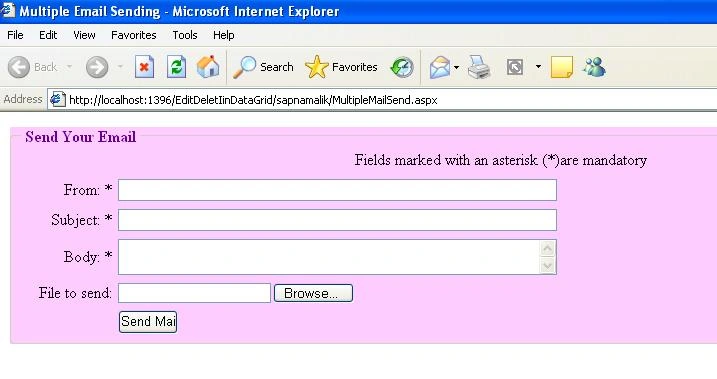
ShalPosted Jan 5, 2021, 4:41 AM
I am getting error here FileName = Path.GetFileName(fileAttachement.PostedFile.FileName); the name path not existing current context
Thiyagu ArockiasamyPosted Dec 8, 2014, 1:52 AM
I am getting error here FileName = Path.GetFileName(fileAttachement.PostedFile.FileName); Filename not existing current context
DEEPAK JADHAVPosted Aug 19, 2014, 3:09 PM
thanks this me help lot
anil babuPosted May 16, 2013, 1:12 AM
I am getting error here FileName = Path.GetFileName(fileAttachement.PostedFile.FileName); Filename not existing current context
narendra reddyPosted Mar 7, 2012, 1:17 AM
thanks for posting
GYANENDRA SINGHPosted Sep 26, 2011, 1:37 AM
Thanks for this nice article.
guruPosted Sep 8, 2010, 4:11 AM
thanx sapna ma'm. this article helped me a lot
Nikhil KumarPosted Sep 16, 2009, 6:34 AM
VERY NICE ARTICLE SAPNA .... KEEP IT UP ...
Former memberPosted Sep 10, 2009, 7:13 AM
Nice article :)