

In this article we will be seeing how to get all the permission levels in
SharePoint 2010 using C# and powershell script.
In this article
- How to get all the permission levels using C#
- How to get all the permission levels using powershell script
- Properties of SPRoleDefinition
Steps involved:
- Open Visual Studio 2010.
- Create a console application.
- Add the following reference.
o Microsoft.SharePoint.dll
- Add the following namespace.
o Using Microsoft.SharePoint;
How to get all the permission levels using
C#:
using
System;
using
System.Collections.Generic;
using
System.Linq;
using
System.Text;
using
Microsoft.SharePoint;
namespace
CustomPermissionLevel
{
class Program
{
static void
Main(string[] args)
{
using (SPSite
site = new SPSite("http://servername:2020/"))
{
using (SPWeb
web = site.RootWeb)
{
SPRoleDefinitionCollection
roleColl = web.RoleDefinitions;
foreach (SPRoleDefinition
role in roleColl)
{
Console.WriteLine(role.Name.ToString());
}
Console.ReadLine();
}
}
}
}
}
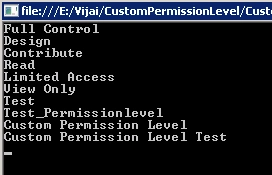
How to get all the permission levels using powershell script
$site=Get-SPSite "http://servername:2020/"
$web=$site.RootWeb
$roleColl=$web.RoleDefinitions
foreach($role in $roleColl)
{
write-host $role.Name
}
Properties of SPRoleDefinition:
$site=Get-SPSite "http://servername:2020/"
$web=$site.RootWeb
$roleColl=$web.RoleDefinitions
$role= $roleColl["Custom Permission Level Test"]
Write-host $role
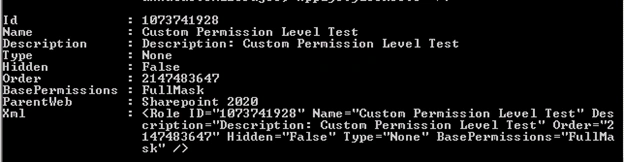
Join the conversation! Your thoughts help the community grow.