

Introduction:
AngularJS has become one of the most popular JavaScript frameworks today which supports building applications with ease. Now the Kendo UI also provides a support to AngularJS. This article explains to you how to integrate the Kendo UI with AngularJS with simple examples.
This is what we are going to see here,


Get Started:
Creating ASP.NET WEB API Project
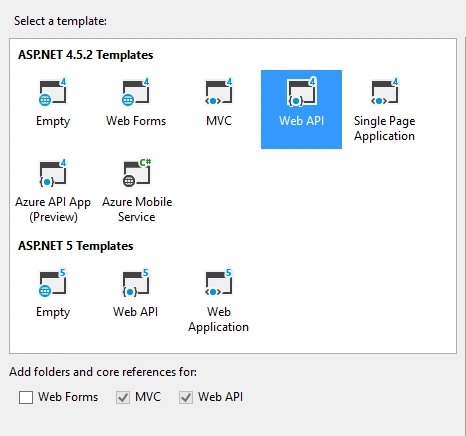
Create a simple Web API project as in the following figures:
Creating a Model Class
Right click on the model folder and add a new class, in my case I named it ColorList.cs:
Code in ColorList.cs:
- {
- public ColorList(int Value, string Text)
- {
- this.Value = Value;
- this.Text = Text;
- }
- public int Value { get; set; }
- public string Text { get; set; }
- }
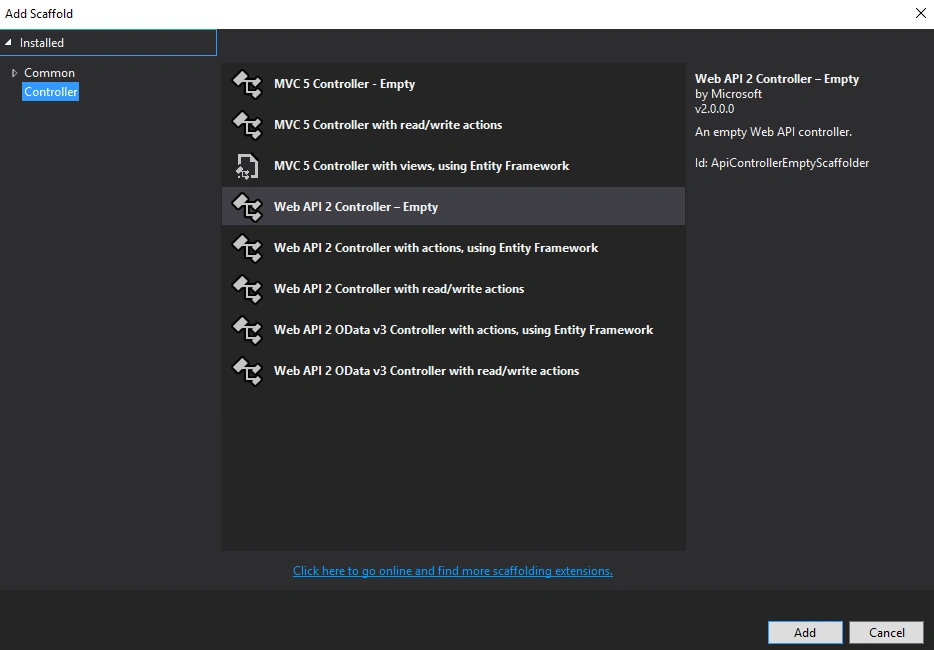
Right click on the Controller folder and add a new WEB API 2- Empty controller as in the following figure 3, in my case I named it ColorController.cs:
Code in ColorController.cs
- [RoutePrefix("api/kendo_ang")]
- public class ColorController : ApiController
- {
- [HttpGet]
- [Route("GetColor")]
- public HttpResponseMessage GetColorList()
- {
- try {
- List < ColorList > color= new List<ColorList>();
- color.Add(new ColorList(1, "Red"));
- color.Add(new ColorList(2, "Green"));
- color.Add(new ColorList(3, "Blue"));
- return Request.CreateResponse(HttpStatusCode.OK, color, Configuration.Formatters.JsonFormatter);
- }
- catch(Exception ex)
- {
- return Request.CreateResponse(HttpStatusCode.OK, ex.Message, Configuration.Formatters.JsonFormatter);
- }
- }
- }
The above employee controller action GetColorList will return a list of colors.
API Test
Test the API using the POSTMAN/Fiddler as in the following figure 4:
API End Point: /api/kendo_ang/GetColor
Type : GET
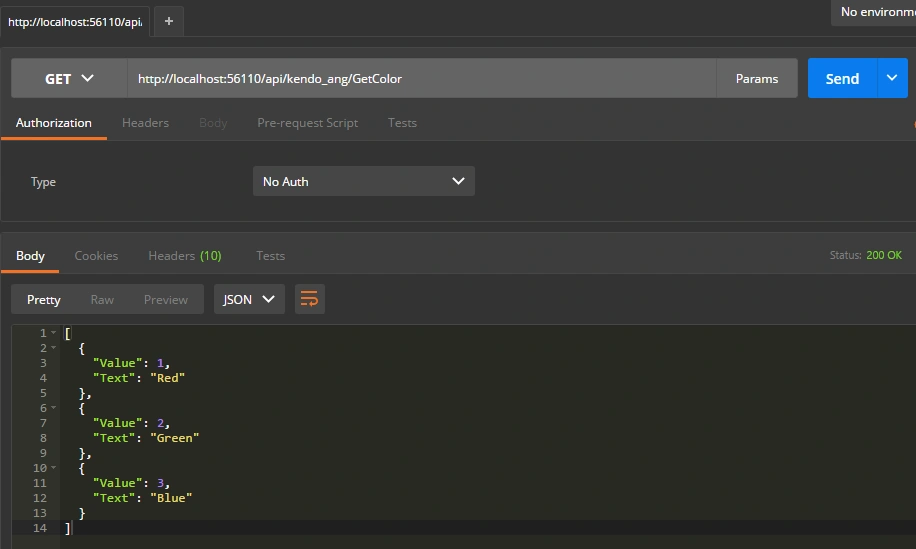
The API is working fine, now it's ready to consume.
Using Kendo dropdownlist with Angular JS
Creating a HTML page
Create a new HTML page in the project.
Design:
- <!DOCTYPE html>
- <html>
- <head>
- <meta charset="utf-8">
- <title>Kendo with Angular JS</title>
- <link rel="stylesheet" href="http://kendo.cdn.telerik.com/2016.1.406/styles/kendo.common.min.css">
- <link rel="stylesheet" href="http://kendo.cdn.telerik.com/2016.1.406/styles/kendo.rtl.min.css">
- <link rel="stylesheet" href="http://kendo.cdn.telerik.com/2016.1.406/styles/kendo.default.min.css">
- <link rel="stylesheet" href="http://kendo.cdn.telerik.com/2016.1.406/styles/kendo.mobile.all.min.css">
- <script src="http://code.jquery.com/jquery-1.9.1.min.js"></script>
- <script src="http://kendo.cdn.telerik.com/2016.1.406/js/angular.min.js"></script>
- <script src="http://kendo.cdn.telerik.com/2016.1.406/js/jszip.min.js"></script>
- <script src="http://kendo.cdn.telerik.com/2016.1.406/js/kendo.all.min.js"></script>
- </head>
- <body>
- <div id="example" ng-app="KendoDemos">
- <div class="demo-section k-content" ng-controller="MyCtrl">
- <h4 style="padding-top: 2em;">Kendo With Angular JS</h4>
- <select kendo-drop-down-list
- k-data-text-field="'Text'"
- k-data-value-field="'Value'"
- k-data-source="colorDataSource"
- style="width: 100%"></select>
- </div>
- </div>
- <script>
- angular.module("KendoDemos", [ "kendo.directives" ])
- .controller("MyCtrl", function($scope){
- $scope.colorDataSource = {
- type: "json",
- transport: {
- read: {
- url: "/api/kendo_ang/GetColor",
- }
- }
- };
- })
- </script>
- </body>
- </html>
Please make sure that you have added angular.min.js file in the project to integrate the AngularJS with Kendo UI.
Properties:
- kendo-drop-down-list - used to define the kendo dropdownlist.
- k-data-text-field- used to define the text field in dropdown.
- k-data-value-field- used to define the value field in dropdown.
- k-data-source - used to define the dataSource for the kendo dropdownlist
Result in Browser:
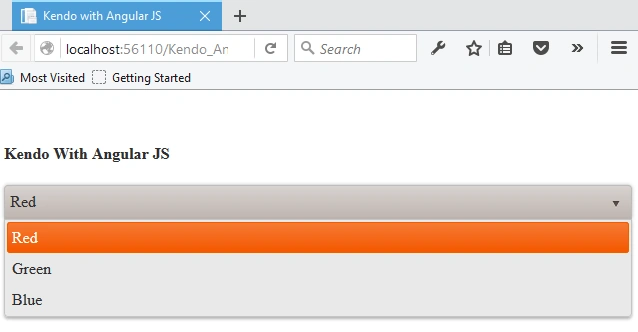
We have seen how to integrate the Kendo UI with Angular JS, which is really useful to build an application with ease.
References:
Vignesh ManiPosted Apr 14, 2016, 8:16 AM
Good
Mohammed IbrahimPosted Apr 13, 2016, 1:14 PM
nice
Bhavik PatelPosted Apr 13, 2016, 5:53 AM
good share
Gowtham RajamanickamPosted Apr 13, 2016, 2:22 AM
I like your article
Gowtham RajamanickamPosted Apr 13, 2016, 2:22 AM
simply sopperb
Debasis SahaPosted Apr 13, 2016, 12:58 AM
Good one..