

SQL Server Constraints
Constraints in SQL Server are rules and restrictions applied on a column or table so unwanted data can't be inserted into tables. Constraints maintain the data integrity and accuracy in the table. This ensures the accuracy and reliability of the data in the database. We can create constraints on single or multiple columns of any table.
Constraints can be classified into the following two types.
Column Types Constraints
Definitions of these types of constraints are given when the table is created.
Create Table My_Constraint
(
IID int NOT NULL,
Salary int CHECK(Salary>5000)
)
Table Types Constraints
Definitions of these types of constraints are given after the creation of the table using the Alter Command.
- Alter Table My_Cosntraint
- Add constraint Check_Constraint Check(Age>50)
SQL Server contains the following 6 types of constraints
- Not Null Constraint
- Check Constraint
- Default Constraint
- Unique Constraint
- Primary Constraint
- Foreign Constraint
Let us understand each constraint briefly.
Not Null Constraint
A Not null constraint restricts the insertion of null values into a column. If we are using a Not Null Constraint for a column, then we cannot ignore the value of this column during an insert of data into the table.
Column Level
Syntax
CREATE TABLE Table_Name
(
   Column_Name Datatype CONSTRAINT Constraint_Name NOT NULL,
);
Example
Create Table My_Constraint
(
   IID int NOT NULL,
   Name nvarchar(50) CONSTRAINT Cons_NotNull not null,
   Age int Not Null,
)
Table Level
Syntax
ALTER TABLE Table_Name
ALTER COLUMN Column_Name Datatype NOT NULL
Example
Alter Table My_Constraint
Alter Column IId int Not Null
Without SQL Command
We can also create a Not Null constraint in Microsoft SQL Server without the execution of a SQL query.
First, right-click on the table and select and click on the design option. Now check all the columns in the "Allow Nulls" option that should have a Null Value.
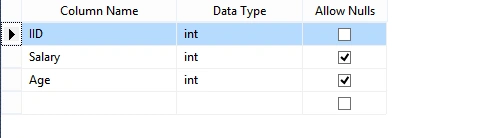
Figure 1 - Table
Check Constraint
A Check constraint checks for a specific condition before inserting data into a table. If the data passes all the Check constraints, then the data will be inserted into the table; otherwise, the data for insertion will be discarded. The CHECK constraint ensures that all values in a column satisfy certain conditions.
Column Level
Syntax
Create Table Table_Name
(
   Column_Name Datatype Constraint Constraint_Name Check(Condition)
)
Example
Create Table Constraint_
(
   IId int Constraint Constraint_Name Check(IId>100)
)
Table Level
Syntax
Alter Table Table_Name
Add Constraint Constraint_Name Check(Condition)
Example
Alter table Constraint_
Add constraint Cons_Name Check(IId>150)
Without SQL Command
First, go to Table Design, right-click on the Column_Name containing a check constraint, and select the "Check Constraint" option. Then, a new window will be shown. In this window, add a constraint and define it in the Expression Field.
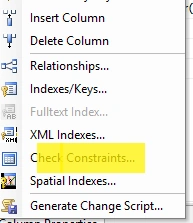
Figure 2 - Check Constraint
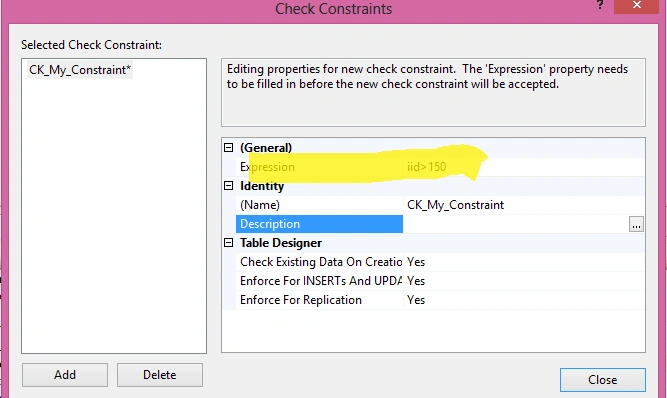
Figure 3 - Select Check Constraint
Default Constraint
Specifies a default value when a value is not specified for this column. If in an insertion query, any value is not specified for this column, then the default value will be inserted into the column.
Column Level
Syntax
Create Table Table_Name
(
   Column_Name DataType Constraint Constraint_Name Default(Value),
)
Example
Create Table My_Table1
(
   IId int default(1500),
   Name Nvarchar(50)Constraint Name_Default Default('Pankaj'),
   Age Int,
   Salary Int Default(100)
)
Table Level
Syntax
Alter Table Tabel_Name
Add Constraint Constraint_Name Default(Value) for[Column_Name]
Example
Alter Table My_Table1
Add Constraint cons_Default Default(40) for[Age]
Without SQL Command
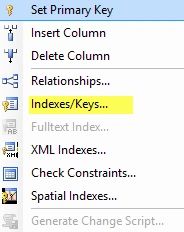
Go to Table Design, click on the specific column name that should have a default value, and go to the column Property and provide the default value.


Kabir MalikPosted Sep 8, 2019, 4:08 PM
Why does we give the name to constraint?
Mahesh AllePosted Aug 9, 2019, 9:39 AM
Good Article. Clear to understand. Keep it.
Mageshwaran RPosted Aug 9, 2019, 12:49 AM
Nice One....
Gunasekhar KotlaPosted Nov 28, 2017, 1:25 AM
Nice one....well explained
Ashish SrivastavaPosted May 16, 2016, 2:26 AM
NICE
Arul RPosted Jan 18, 2016, 6:58 AM
Nice share
Pankaj Kumar ChoudharyPosted May 23, 2015, 11:50 AM
Thanks @Nitin Sir..........
NitinPosted May 23, 2015, 8:57 AM
nice one
Pankaj Kumar ChoudharyPosted May 22, 2015, 8:16 AM
Thanks you Abhishek G................
Abhishek JaiswalPosted May 22, 2015, 1:09 AM
Very well explained. Keep it up buddy! :)